How to find startups on LinkedIn: Prospecting tips
Step-by-step guide: find startups on LinkedIn. Covers Sales Navigator, LinkedIn hacks, Crunchbase, and scaling outreach with automation.

LinkedIn is a goldmine for early-stage startups—but only if you know how to dig.
In this guide, we’ll cut the fluff and show you the exact filters, searches, and hacks to find high-potential startups and connect with them before anyone else does.
We’ll also touch on the best places to find startups outside of LinkedIn.
Why Finding Startups on LinkedIn Should Be a Priority
Startups are different from enterprise accounts. They move fast, test new tools aggressively, and don’t get buried under six hundred layers of procurement. That makes them some of the best prospects you can reach on LinkedIn.
But do they have the budget? In a word, yes. And they’re always growing. A Series A company with 20 employees could be at 200 within a year. Getting in early means your product scales with them.
Take Lovable, a Series A startup that raised its last round of $200 million funding in July 2025 and was valued at $1.8 billion. At the time of writing, they offer 20 open positions and are still growing.

Plus, startups don’t sit on buying decisions for six months. If your solution solves a clear pain point, they’ll test it this week.
And the greatest benefit of all? There’s no red tape. One LinkedIn DM to the founder or head of sales can be all it takes to start a deal.
Using LinkedIn’s Built-in Search & Filters
LinkedIn already gives sales reps most of what they need to prospect early-stage startups. They just have to know where to click and what filters to apply.
Company Search Basics
Start with the search bar and simply type in a title like startup, but don’t stop at the first result.
Select Companies from the drop-down.
Hit All Filters and refine by Industry, Company Size, and Location.
For early-stage targets, prioritize 1 to 10 employees and 11 to 50 employees. That’s the sweet spot for seed to Series A-stage startups still shaping their stack.
The catch is that you won’t find many ideal targets with a free LinkedIn search because the list will fetch companies that have “startup” anywhere in their description, including in a list of industries they serve.
Nevertheless, it’s a low-effort start.
Keyword & Boolean Hacks
LinkedIn’s People search supports Boolean operators—and this is where magic happens. Use them to zero in on signals of stage and type and create niche-specific lead lists.
Imagine your ICP is a startup in the agriculture niche. Use the following boolean string to broaden your search: “Founder” OR “Co-founder” AND “startup” OR “early stage” with an extra layer of filters like Location, Industry, and Profile language.
Keywords like “building in public” and “bootstrapped” also suggest early-stage startups. Try to add them to your search to broaden your lead list.
Here are some more Boolean search strings to help you get started:
“Series A” OR “Seed” AND (startup OR “early stage”)
“AI startup” OR “SaaS startup”
“YC-backed“ OR “Techstars“ (if you’re chasing accelerator alumni)
“Head of Growth” AND (“Pre-seed” OR “Seed stage”)
“AI startup“ OR “machine learning startup”
“Fintech startup” OR “crypto startup”
Make a note of these searches so you don’t have to reinvent the wheel every time.
“Find Similar Companies” Trick
One good startup lead can unlock fifty more. On some company pages, the right sidebar shows People also viewed. These aren’t exactly similar companies, but the feature often surfaces other niche-relevant startups.
Follow Startup Hubs & Accelerators
Most programs like Y Combinator, Techstars, or 500 Startups shout about the wins and successes of their participants.
Smart SDRs use this trick to their advantage—here’s how they prospect:
Search the accelerator page by its name.
Use the Posts filter to see which startups are announcing funding or product launches.
Analyze comments and likes to spot even more early-stage founders.
Leverage Hashtags
Yeah, hashtags feel fluffy, and like nobody uses them anymore, but many startups still add them for visibility. Hit the Posts button and search for #SeedFunding, #EarlyStage, #TechStartup, #YCdemoDay, #Fortune500, #YC23, #YC24, #YC25, and the like. Then, sort by Latest and Past month.
LinkedIn Sales Navigator Hacks
LinkedIn Premium gives sales reps full access to its database, meaning they will have a vastly larger pool of startup prospects. Use these three proven LinkedIn Sales Navigator tactics to find startup B2B leads.
Headcount Growth Filter
Sales Navigator tracks employee growth—and you can use this filter to find startups at a rapid scale.
Sales Navigator offers a Company Headcount Growth filter (min to max over the last 12 months). Try setting it to 10–25% growth and layering with company size = 1 to 50 to isolate small but scaling teams. But be aware that not all startups’ growth data appear on LinkedIn, so always combine this filter with other signals (funding, hiring, keywords, etc.).

Automate your outbound with an AI BDR
Meet Ava—your AI BDR who handles prospecting, outreach, and follow-ups, so your team can focus on closing.
Funding Mentions in Company Spotlight
LinkedIn Sales Nav collects recent funding rounds under the Company Spotlight panel. It stores more mentions than SDRs can fetch through simple keyword research via Posts.
If the funding signal is indexed, you can add keywords like Seed, Series A, and VC-backed to the Spotlights filter. Save companies with fresh funding, as they’re likely expanding GTM budgets. For extra context, cross-reference with Crunchbase or TechCrunch before outreach.
Alerts and Saved Accounts
In Sales Navigator, you can save accounts and receive alerts about activities like a new funding round, a VP hire, or a wave of job postings. These are the clearest signals a startup is ready to buy.
How to set up alerts in Sales Navigator:
Save a company (via Save as Account) or a person (as a lead).
On your Sales Navigator homepage, alerts for your saved entities appear under a feed labeled Alerts.
Use filters on that alerts feed to focus on specific alert types: e.g., account news, account growth, and new decision makers.
Navigate to Settings > Notification & alert preferences to toggle which kinds of alerts you want to receive on LinkedIn or via email.
Check your Sales Navigator homepage daily for new alerts.
Crunchbase & External Data to Fuel LinkedIn
If LinkedIn is where you engage, Crunchbase is where you discover. In fact, Crunchbase provides one of the easiest ways of finding early-stage startups.
Crunchbase Startup Search
To build a comprehensive startup search in Crunchbase, you’ll need access to the Pro or Business tier. Once subscribed, you’ll get access to tons of startup filters.
How to Use the AI Search Builder
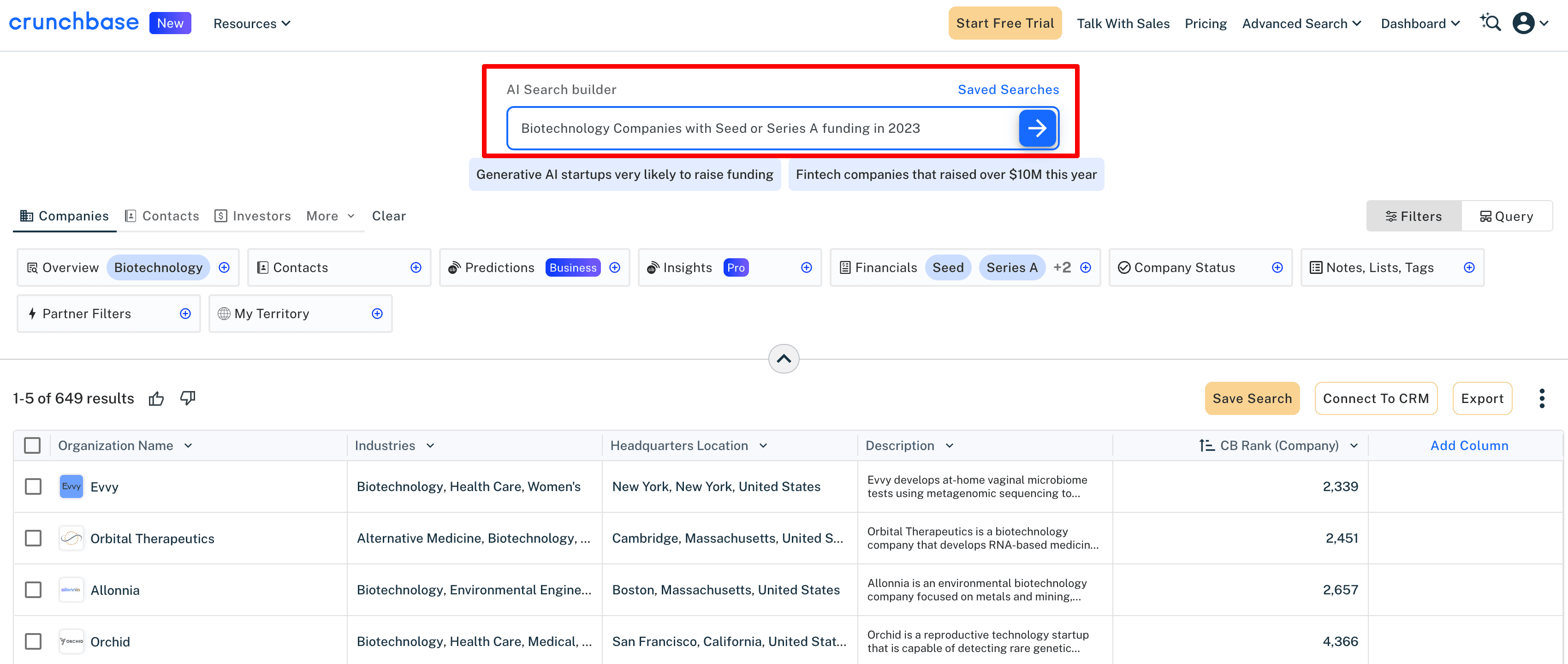
The fastest way to find startups by specific criteria is to prompt Crunchbase’s gen-AI. To illustrate this, we searched for biotech startups that received seed or Series A funding between 2023 and 2025. It took about 30 seconds for the AI to return a carefully curated list of biotech companies.
How to Use Crunchbase Filters
If you want to set concrete parameters for your search, do it manually. For example, filter by Number of Employees and combine that with the Last Funding Date in the past six months to find startups that are likely still in budget allocation mode. You can also find startups by Leadership Hire, Growth Score, and Growth Events.
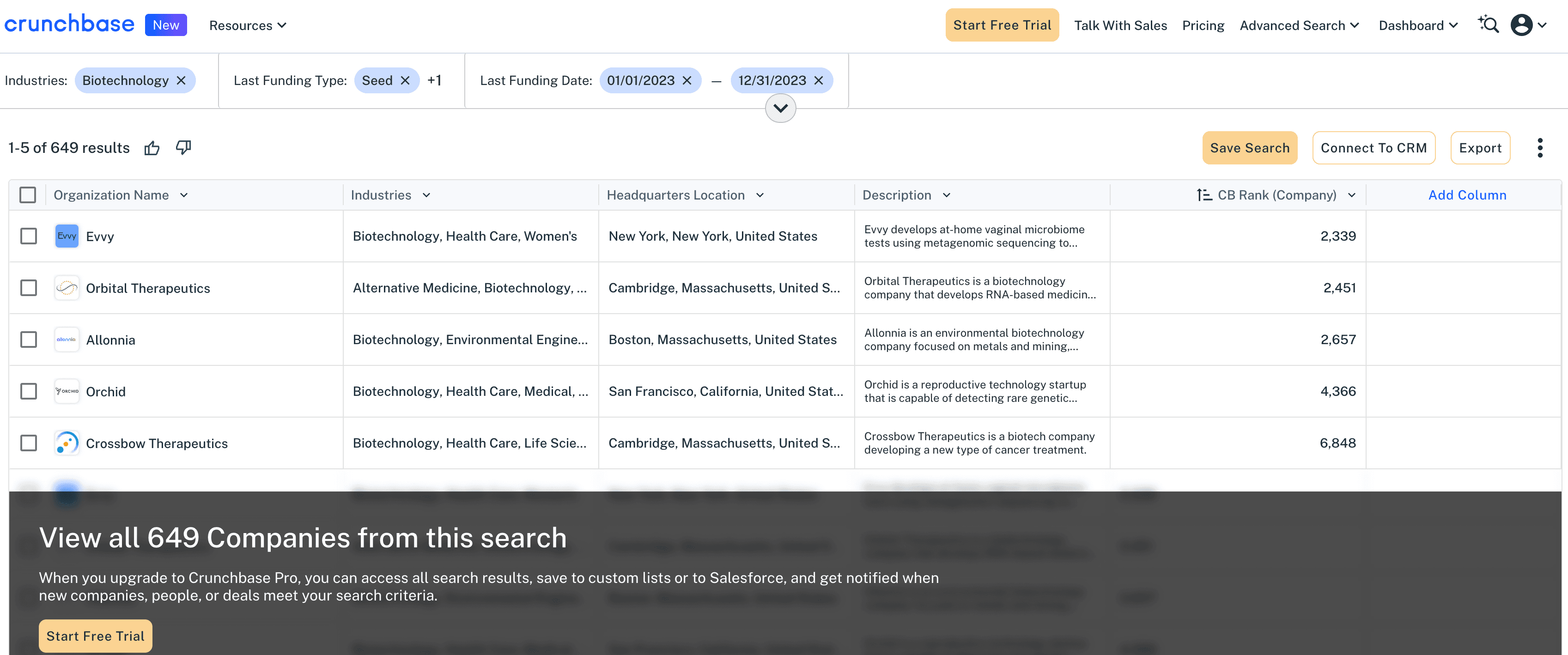
Keep in mind that some companies may lack full funding metadata (especially early or bootstrapped ones). Use multiple filters, such as funding, employee count, and date, to account for this.
Crunchbase Pricing
Crunchbase offers a 7-day free trial of its Pro plan, which starts at $99 per month (billed monthly).
In the Pro tier, you’ll get access to the following:
4M+ private companies with full results
High-potential companies with real-time financial data
Export feature for up to 2K rows per month to analyze search results
The Business plan starts at $199 per month (billed annually), with no free trial.
This plan includes everything in Pro plus the following:
Export additional data with (5K rows per month)
Industry trends analysis
Proprietary Predictions and Insights features
CRM integrations and auto-enrichment add-ons
Combine Crunchbase and LinkedIn
Once you have a Crunchbase list, match it to LinkedIn to build real outreach touchpoints. Your Crunchbase list will be in the CSV format, with names, websites, employee counts, funding rounds, and more.
Go to LinkedIn Sales Navigator, and save these entries as accounts or leads. When Crunchbase alerts you to relevant activity, trigger an outreach sequence in LinkedIn (connection request with a warm intro) while the moment is still fresh.
Finding Early-Stage & Remote Startups
Startups in their first funding rounds are often the fastest to buy and scale. They’re small, nimble, and eager to experiment with new tools. The trick is spotting them before every other vendor bombards them with outreach.
Early-Stage Playbook
Accelerators like Y Combinator and Techstars are the easiest entry points for finding early-stage startups. They both have official lists of alumni on their websites, filterable by batch, industry, location, and company size.
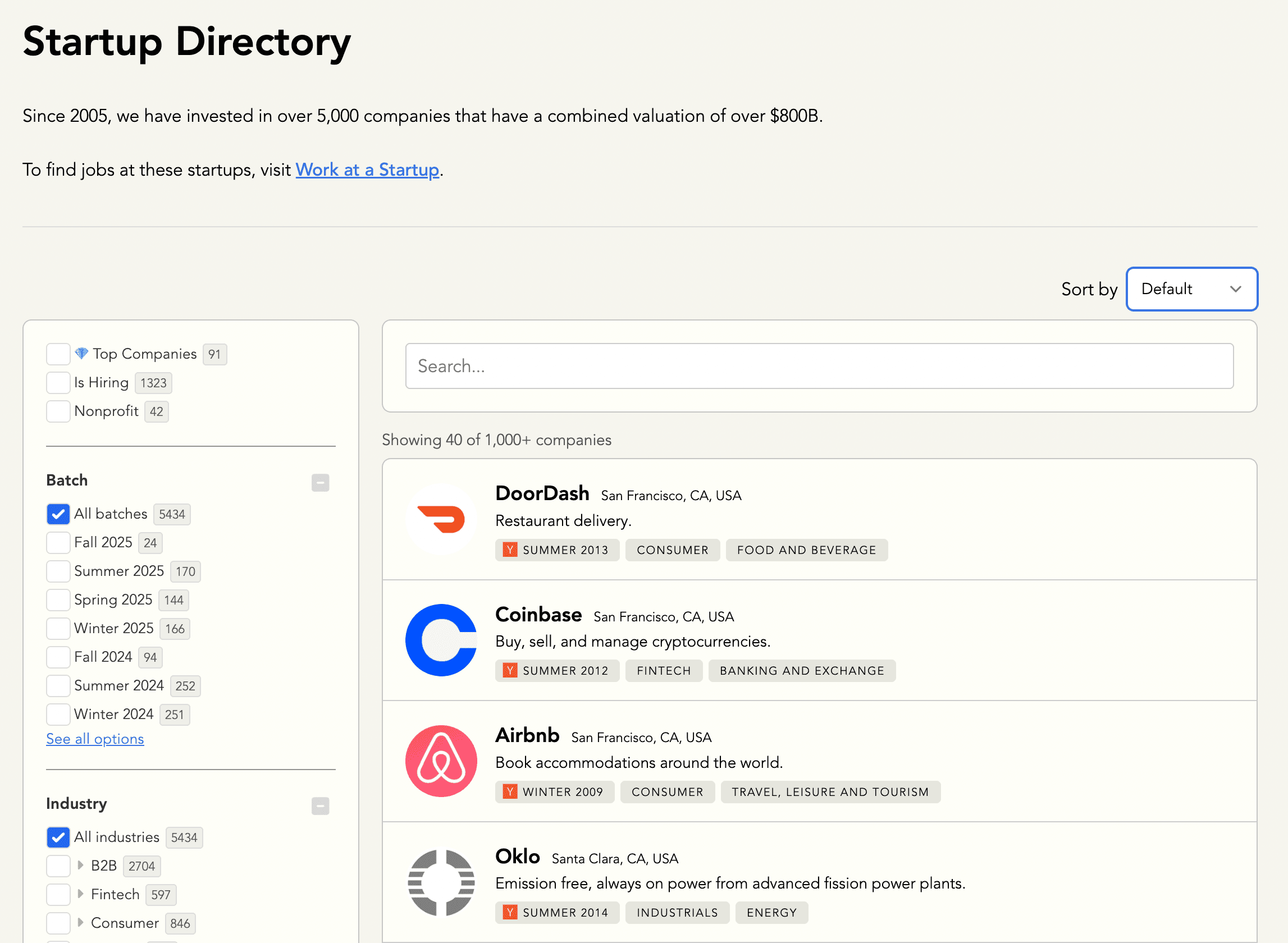
Once you have names, find them on LinkedIn and set relevant alerts to track intent triggers.
Remote-First US Startups
Remote-first startups usually experiment with new tech to keep distributed teams productive. They also hire across time zones and scale fast without office overhead. That flexibility often translates into openness to new vendors.
Since every sales rep out there wants to connect with such startups, they’re not easily spotted.
Here are a few tricks to find startups with remote teams:
Run a Boolean Search on the LinkedIn People tab: “Founder” AND “remote-first”, “Head of People” AND "distributed team”.
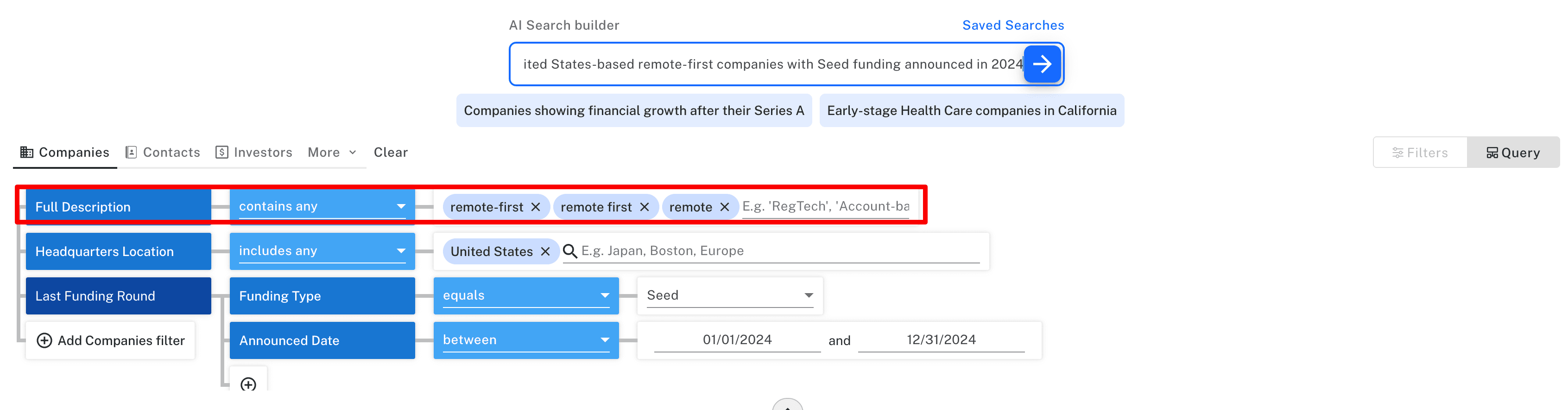
Prompt Crunchbase’s AI Search builder to find remote-first startups and specify other criteria. AI will generate a list of companies that contain similar keywords in their descriptions—a super handy feature.
The Prospecting Grind Ends Here
Automation is no longer optional. It’s a necessary part of a modern prospecting workflow.
Automation prevents your reps from pouring hours into mundane work. Go one step further and add AI BDRs to the mix that can prospect new startups from across the web and personalize outreach as well as humans, and you’ve given yourself a unique competitive edge.
Reps sleep, but your AI-powered automation keeps working and mining data 24/7.
Automate your outbound with an AI BDR
Meet Ava—your AI BDR who handles prospecting, outreach, and follow-ups, so your team can focus on closing.

Jenny Romanchuk
SME @ Artisan
Jenny creates senior-level content for sales, SEO, and marketing professionals. She also leads partnerships at the District #1 Charitable Foundation.