10 pre-event email templates that boost attendance
Need a proven pre-event email template? Grab 10 ready-to-use examples plus tips for CTAs, subject lines, and event marketing automation.
Event attendance and ROI go hand in hand.
If you’re struggling to fill seats, there’s a simple fix: improve your pre-event email marketing.
An email sequence built on proven templates convinces leads to register and show up on the day. All without changing your lineup, venue, or approach.
Build a pre-event email sequence that sells the event for you
Your pre-event email sequence is where you prove the event deserves a place on leads’ calendars. It’s a fundamental part of any event strategy. Each message should build upon the last to generate interest, urgency, and, ultimately, conversions.
Map out your event email workflow (from announcement to reminder email)
An email workflow with four to six touches ensures you send messages at the right time, build momentum, and create urgency.
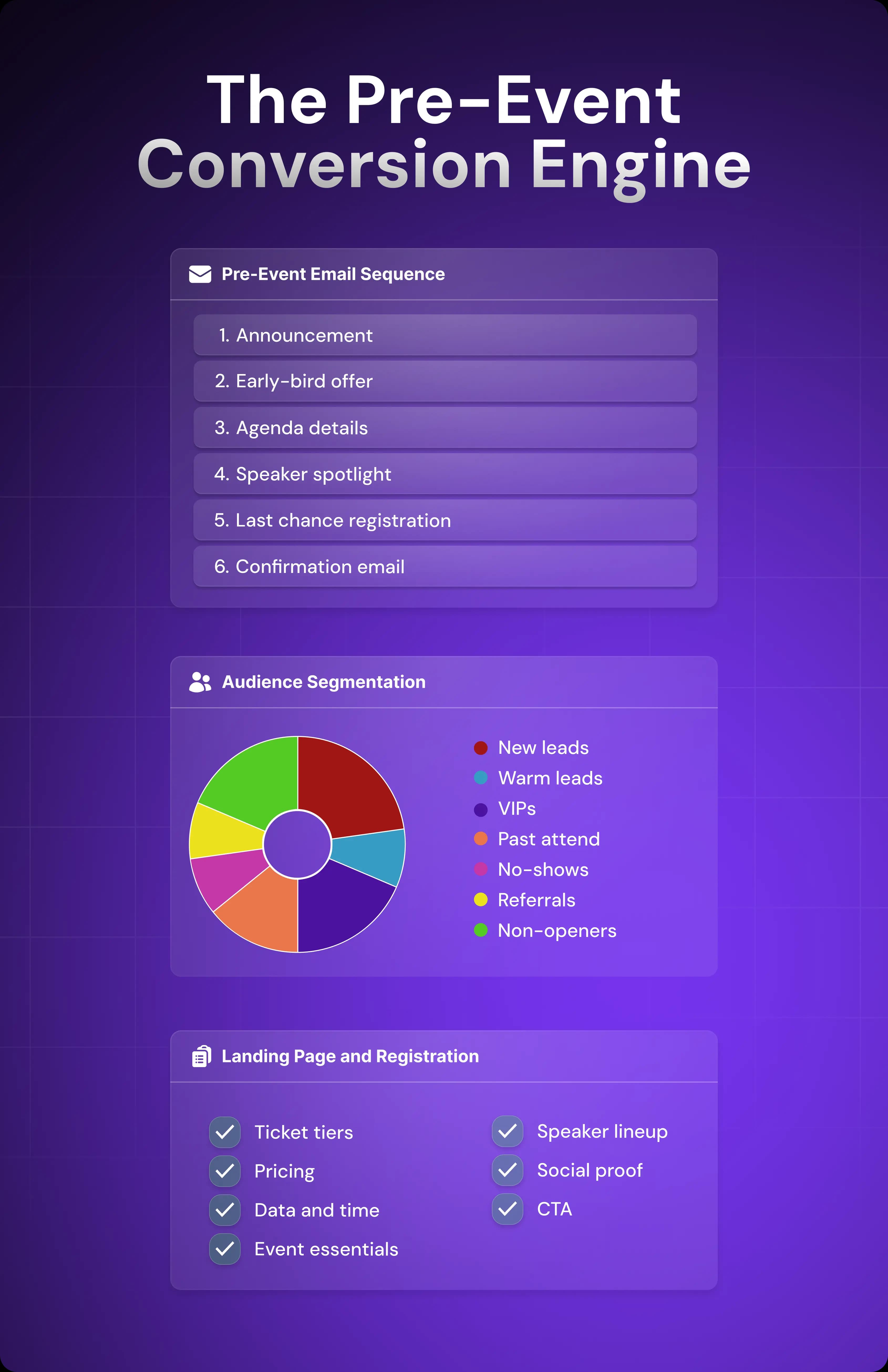
Include the following emails in your pre-event sequence:
Announcement: The announcement email generates awareness. Share when the event is happening, the benefits, and the headline speakers (if you have booked them at this point).
Early-bird offer: Discounted pricing for a limited number of tickets or a time-limited offer creates a sense of urgency.
Agenda details: Publishing the full agenda allows prospects to determine whether or not the event is a good fit for their role and experience level.
Speaker spotlight: Once the lead is aware of the event, you can spotlight individual speakers or sessions that are relevant to the recipient to generate interest.
Last-chance registration: Use urgency and scarcity to convince undecided prospects to sign up for the event.
Confirmation email: Once registered, send clear attendance details and reinforce value with social proof (this will reduce no-shows).
A repeatable sequence makes email marketing campaigns easier to plan, dispatch, and optimize.
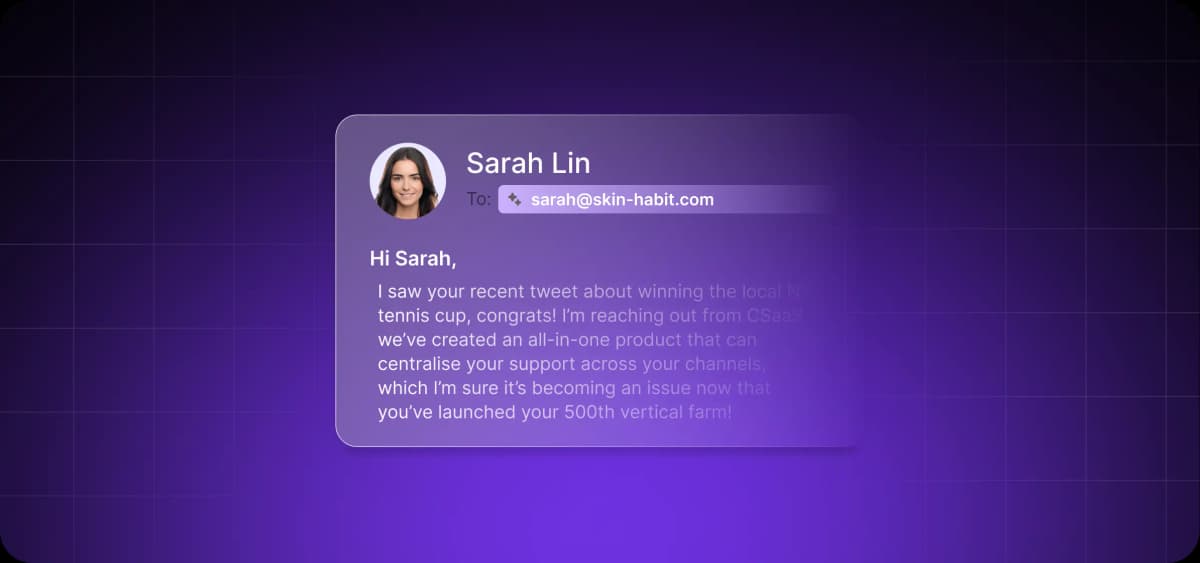
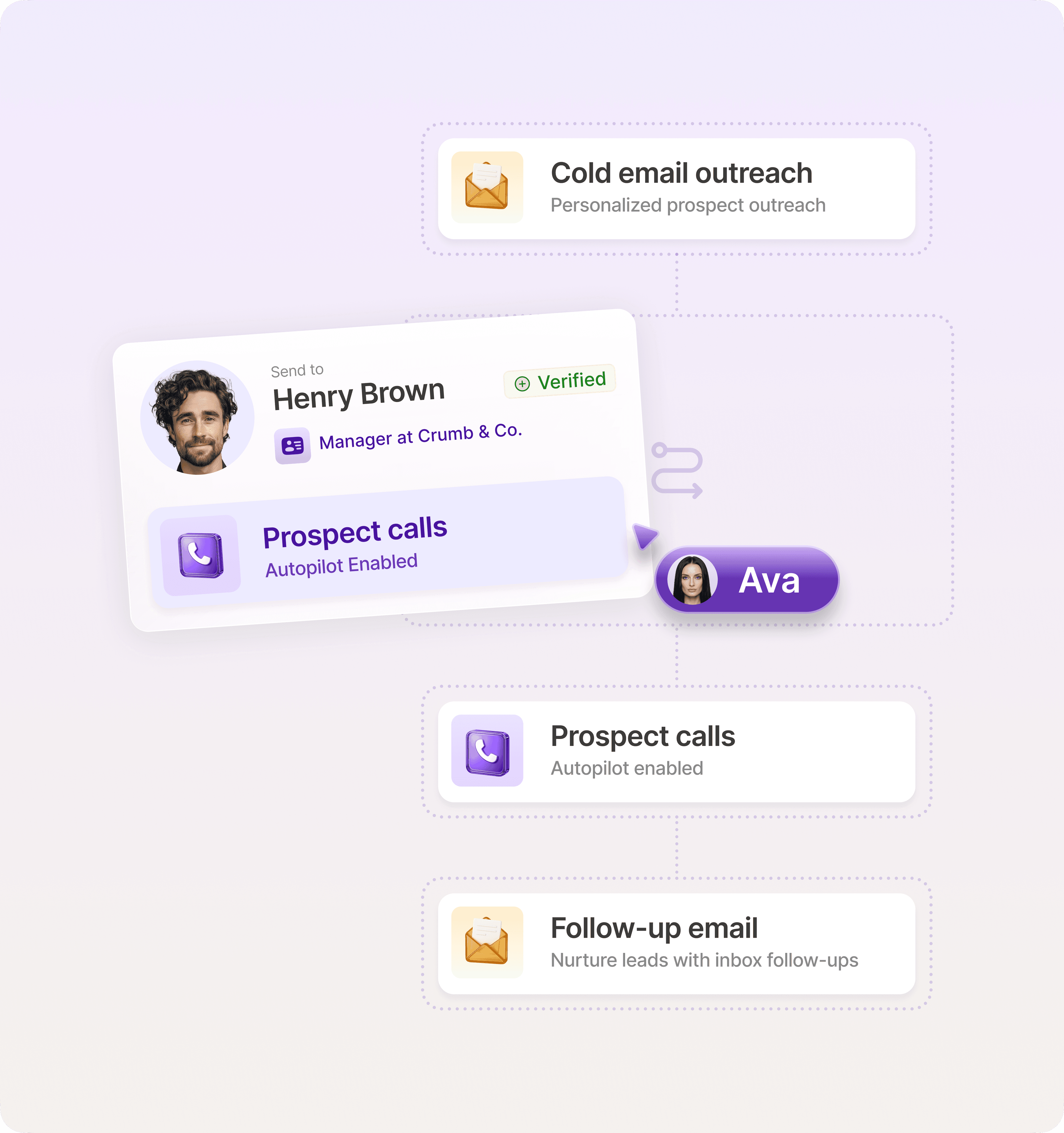
Modern tools like Artisan accelerate this even further. Artisan’s AI BDR, Ava, automates AI-powered lead nurturing and schedules, personalizes, and triggers emails based on engagement and lead characteristics without manual effort.
Segment your email list for maximum conversions
Generic emails hurt open and click-through rates. By segmenting your audience by behavior and intent, you can send messages that speak directly to each lead’s pain points and interests.
Here are the most common segments for events and the approaches they require:
New leads require longer introductions to the event, more precise explanations of its value, and social proof.
Warm leads are ready to buy; convince them by highlighting relevant speakers and offering time-limited offers.
VIPs respond to early access sessions, exclusive perks, and priority seating.
Past attendees offer an opportunity to build on familiarity and outline what’s new.
No-shows need to be shown understanding. Address friction and share testimonials from past attendees who benefited from your event.
Referrals tend to respond to peer validation and are generally more willing to refer others.
Non-openers must be re-engaged with new subject lines that create urgency or show personal value.
You should also tailor emails to roles and pain points. A CMO, for example, will care about strategy, ROI, and market impact, while an assistant marketer will be more interested in tactics, tools, and practical takeaways.
Create a seamless landing page and registration flow
Even a perfect email sequence won’t drive conversions if it leads to a poorly functioning or uninformative website. Your landing page is where registrations really happen.
Your event website should serve as a base for potential attendees to find all the information they need—where the event is, who will be there, and the value of attending.
Include these sections on your event landing page:
Ticket tiers and pricing: Attendance options (early bird, standard, VIP) and what each includes
Event essentials: Date, time, location, and online platform
Social proof: Testimonials, past attendee quotes, partner logos, and videos of past events
Speaker lineup: Who will be speaking, their position (whether they’re industry leaders, highly certified, or employed by a top company in your niche), and the topic they’ll cover
One clear CTA: A prominent “Register” button repeated at natural scroll points
How your website works is just as important as the information you share. If the page is slow or clunky, the increased friction may cause leads to click away, even if they intended to sign up for your event.
Aim to keep load times at or below two seconds and always test the website and checkout on both desktop and mobile devices. Mobile is now responsible for 51% of global internet usage.

Automate your outbound with an AI BDR
Meet Ava—your AI BDR who handles prospecting, outreach, and follow-ups, so your team can focus on closing.
What makes a high-converting pre-event email (template anatomy)
Your emails should inspire readers to click, engage, and go to your landing page. The subject line, copy, and CTA each play specific roles in driving this conversion.
Craft a click-magnet subject line
The subject line is the gatekeeper. It’s the only element of your email that can win the click. You must engage readers here for the rest of your email to matter.
Here’s how to inspire clicks using your subject line:
Speak to hopes and concerns: Target the buyer's pain points and aspirations. When you align with your audience’s reality, you’re more likely to inspire action.
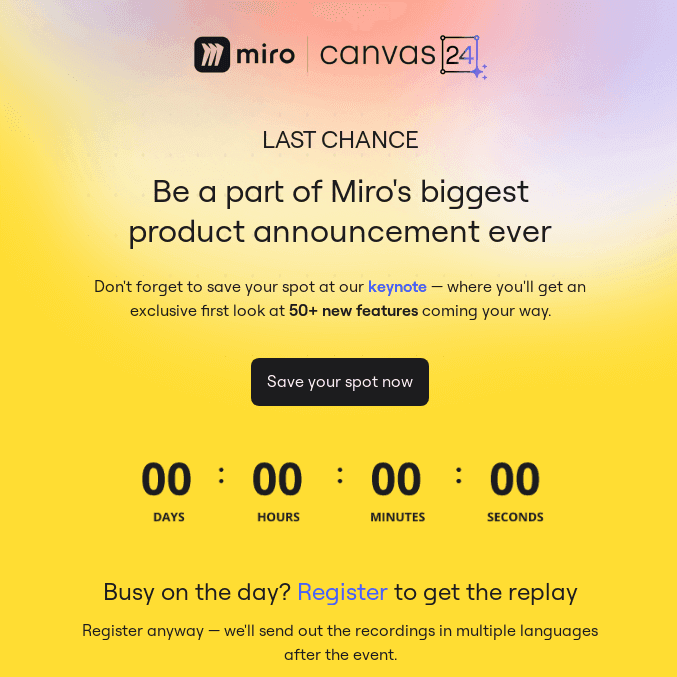
Create urgency: Use countdowns or urgent terms, such as “Last chance,” to create a sense of time pressure, as seen in the email by Miro below for its Canvas 24 event.
Evoke curiosity: Focus on what the lead can learn from the event and showcase speakers in their field.
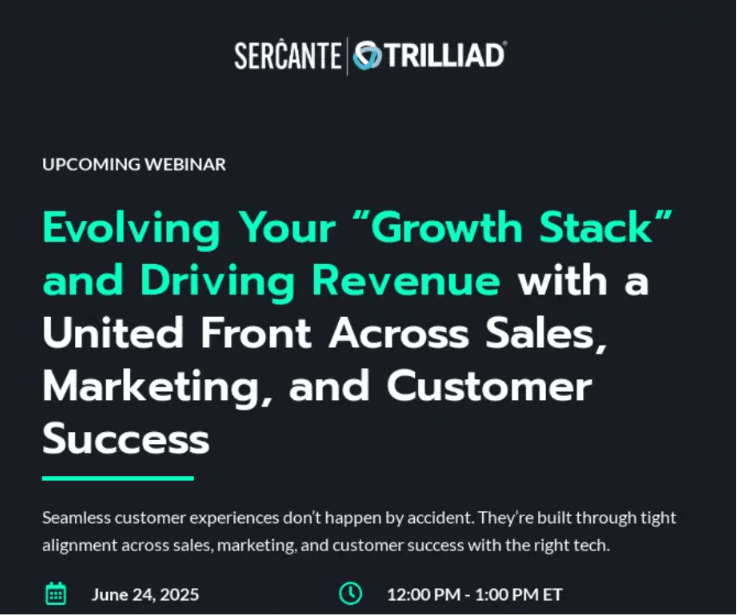
No matter the angle, use specific wording where possible. Instead of “event,” say “in-person event,” “webinar,” or “virtual seminar.” Specificity, as seen in Sercante's email below, boosts relevance and opens.
Here are five examples of effective subject lines:
Last chance: Registration closes in 24 hours!
Save the date: [event name] is in [city] on [event date]
Don’t miss out: Only 50 tickets left for [event name]
Exclusive: Get the full agenda for [event name]
News flash: [relevant speaker] is coming to [event name]
Keep subject lines to 10 words or fewer, and put the most valuable information first because mobile devices typically show only 6 to 7 words.
Never forget that email personalization is very powerful for building rapport with recipients. By tailoring the subject line, you’re more likely to win the click.
For example, an event marketer in the sales niche might send an email to a warm lead with a subject line about a session relevant to their role, such as “John Jakowski on scaling pipeline at SalesSummit.” Alternatively, a previous VIP attendee is likely to respond well to a message about premium access to speakers, such as “Exclusive Q&A with John Jakowski for VIPs.”
Keep the copy scannable and value-driven
Most people scan emails, avoiding text blocks, skipping introductions, and jumping straight to the most relevant details. Your job is to ensure that key information is impossible to miss.
Make emails scanning-friendly with the following edits:
Short paragraphs: Two to three sentences per paragraph is a good rule of thumb. This adds more white space and makes text feel more manageable.
Bold highlights: Bold key information, such as the event date, location, and speakers, to help scanners find and re-find it quickly.
Bullet points: Writing a list of speakers, key takeaways, or event details in paragraph form? It’s best to switch to bullets for clarity.
Don’t cut out essential data while shortening emails. For in-person events, explain the location, session tracks, parking, transport, and on-the-day logistics. For virtual events, outline how to sign up, where to watch, and any technological requirements.
It’s also important to think about visuals. Boost trust and recognition by using your brand colors, fonts, and logo. Cohesive email and landing page design creates a seamless, credible experience.
Use strong CTAs that drive action
Once you’ve won the click and engaged the reader, your CTA is responsible for the final job of moving them to your landing page.
Here are examples of strong CTAs and why they work:
Save my seat: Creates a sense of scarcity
Claim your early-bird offer now: Boosts urgency while also offering a deal
View agenda: Prompts lower-intent leads to learn more
Reserve my spot: Provides a simple next step for interested leads
Placement and clarity matter as much as the wording itself. Simple, action-oriented language that flows smoothly from the body copy is best. In addition, a little repetition can go a long way. Repeat your CTA at natural stopping points so readers don’t miss it.
10 pre-event email templates for every stage of your sequence
Now that you’ve put the foundation in place, it’s time to build your sequence with templates tailored to different segments and lead types.
1. Save the date pre-event email template
The first step is to build awareness of your event. Don’t ask for an RSVP off the first bat. Instead, ask the potential attendee to save the date in their calendars, ready for you to build interest later.
Subject: Join our in-person event on [event date]!
Hi [first name],
We’ve got exciting news.
[event name] is coming to [location] on [event date].
We’ve noticed that many [target audience] are struggling with [pain point] this year. That’s why we created [event name]—to break down why [desired outcome isn’t happening] and how you solve the issue.
Our events sell out early, so be sure to save the date.
Add to calendar
2. Event announcement email template
Break the ice by informing prospects about your event. An event announcement email doesn’t aim for conversions. Instead, it builds anticipation and lets leads know what to expect.
Subject: [event name] is coming to [location]
Hi [first name],
We’re launching [event name] to help [target audience] stay up to date with [core topic].
Here’s what’s on the schedule:
Thought leadership session run by [speaker name] from [company name]
[workshop topic] workshop run by [expert title], [speaker name]
Exclusive hands-on sessions with [speaker name]
Check out the full agenda now
3. Early-bird ticket email template
One of the most effective ways to engage leads is to offer discounts and perks. This email should outline the benefits of buying early, what the event offers, and when the discount ends to increase urgency.
Subject: Early-bird prices end in [timeframe]!
Hi [first name],
You’re ahead of the game.
Sign up for [event name] today and save [discount amount].
This event is designed to help [target audience] achieve [primary outcome] in [time period]. We’re bringing together thought leaders on [topics] to share practical insights you can apply immediately.
And it’s working. Since our last [event type], [company name] achieved [specific result] after applying insights from our speakers.
Want similar results? Act fast—early-bird tickets end in [timeframe].
Click here to RSVP
4. Webinar/virtual event invitation template
Generally, virtual events require less investment from attendees. All you need to do is highlight the event's value and share the details.
Subject: Join our virtual event: [event name]
Hi [first name],
We’re hosting a live virtual session of [event name] at [time] ([time zone]) on [event date], and we’d love you to join us.
This event is focused on helping [target audience] achieve [primary goal] without compromising on [constraint].
During this session, you’ll learn:
The [content type/strategy] driving the strongest results in [year], and which ones are declining
The one tactic that helped [company name] improve [metric] by [percentage]
How leading teams improve [key metric] without increasing [effort or resource]
All you need is access to [platform] to take part.
Register for the virtual event now
5. In-person event logistics template
This informative email should prepare potential and confirmed attendees for your in-person event. Include all the key details, such as transport, dress code, and must-bring items.
Subject: Everything you need to know before [event name]!
Hello [first name],
We’re looking forward to sharing practical strategies for helping [target audience] achieve [primary outcome] at this year’s [event name].
With the event just [timeframe] away, here’s a quick overview of everything you need to know:
Parking: [parking details]
Public transport: [public transport details]
Dress code: [dress code]
Directions: [link or instructions]
What to bring: [items to bring]
Any questions? Don’t hesitate to reply to this email. Otherwise, we’ll see you there.
6. Speaker announcement email template
Here’s your chance to hype your agenda. In this email, you should showcase speakers in the recipient’s field. For example, if they’re the head of sales, focus on management and technology. If it’s a salesperson, share a session about closing deals.
Subject: [speaker name] has joined [event name]!
[event name] is shaping up to be a hub of real-world expertise. We’re excited to announce that [speaker name], [job title] at [company name], will be speaking.
At the event, they’ll share practical insights on:
How top performers approach [core topic]
The specific that helped [company name] improve [metric] by [percentage]
How [target audience] can use [tools/data/process] to improve [outcome]
These insights are essential for [audience segments] looking to achieve [desired outcome].
Book your spot now
7. Schedule/agenda reveal email template
After you’ve built awareness around the event and shared early-bird pricing, you can reveal the full schedule. Don’t focus solely on the speakers—share the lessons attendees can take away from each session. If your event spans more than one day, focus on the highlights in your email.
Subject: [event name] agenda revealed
Hi [first name],
The agenda for [event name] is live.
This year, we’re helping [target audience] achieve [primary goal] in [year]. The sessions cover [core themes], with practical insights you can apply immediately.
Here’s the agenda overview:
[time]: Opening keynote on [session topic]
[time]: Breakout session on [session topic]
[time]: Case study on [case study topic], with [speaker name]
[time]: Live Q&A on [key discussion areas]
[time]: Closing session on [closing topic]
That’s everything you need to achieve [desired outcome].
Reserve my spot
8. Referral request pre-event template
Referral requests work well for both those who haven't signed up and those who have. You have two options: encourage attendees to invite colleagues to gain additional perks or provide benefits to both referrers and their referree.
Subject: Refer a coworker to [event name] for a VIP upgrade
Hi [first name],
You’re already registered for [event name], and we thought you might know a coworker or friend who’d also benefit from attending.
If you invite a colleague to register and they sign up, you’ll both unlock [reward type] as a thank-you.
You’ll both get access to:
[benefit one]
[benefit two]
benefit three]
To claim these benefits, click the referral link. We’ve already written the invite for you.
Refer a colleague
9. Last-chance registration email template
Inspire last-minute registrations by using urgency. You should include the number of tickets or the amount of time left to book in the subject line to encourage clicks.
Subject: Last chance: Just [number] tickets left
Hi [first name],
[event name] on [event date] is almost sold out. We’re down to just [number] tickets, and we’d love you to be there.
If you miss it, you’ll lose out on discovering [number] proven frameworks for [key outcome] from [expert title] [speaker name], plus an interactive session with [speaker name] on how to [desired outcome] without [common constraint].
If you’re responsible for [role or responsibility], this event is for you.
Save my seat
10. Day-before event reminder template
Prevent no-shows by alerting attendees about the event the day before. This is especially important for virtual and free events, which are easy to forget.
Subject: Tomorrow: Final details for [event name]
Hi [first name],
Just a quick reminder that [event name] is happening tomorrow.
Here’s everything you need to attend:
Date: [event date]
Time: [event time]
Platform: [platform]
Link: [event link]
Get ready to learn about [core topic] with insights from speakers who bring [combined experience] of experience.
You can access all event details here: [link to event details]
Looking forward to seeing you.
Optimize your pre-event email marketing for maximum attendance
Once you’ve created a sequence, you have a baseline for improving it. If you treat events like a repeatable GTM motion, small improvements in timing, targeting, and messaging will compound into higher attendance and fewer no-shows.
Test subject lines, CTA buttons, and send times
You may feel pressure to achieve sky-high results the first time, but a smarter, more realistic approach is to refine performance over the long term.
Consistent A/B testing creates meaningful gains in open rates, click-throughs, and registrations. And your approach doesn’t need to be complex. Testing one variable at a time will reveal which messages, subject lines, and CTAs resonate with your audience.
Here are two examples of A/B tests for subject lines:
Urgency vs. value: “Last chance to join” vs. “Learn how SaaS teams generate pipeline with events.”
Outcome-driven vs. informational: “Book more demos through events” vs. “Event agenda revealed.”
Here are three A/B test examples for CTAs:
Register now vs. Save your seat
View agenda vs. See what you’ll learn
Join the event vs. Get the live link
Finally, here are examples for sequence scheduling:
Four weeks vs. two weeks before the event: Time-bound messaging may perform better when delivered earlier.
Agenda reveal timing: Test sending detailed agendas after early-bird pricing ends vs. before to see which drives more conversions.
Day and time: Mid-week mornings often perform well for B2B, but test Tuesday vs. Thursday and morning vs. afternoon.
Add social proof and trust signals
When creating cold email templates for product or service sales campaigns, it’s a given that social proof and trust signals help convince leads that you’re worth the investment. Events are no different.
Here’s how to include social proof and trust signals in your pre-event emails:
Include short testimonials from past attendees highlighting tangible outcomes or value gained.
Highlight speaker authority by mentioning titles, company names, notable achievements, or recognizable brands they’ve worked with.
Showcase partner, sponsor, or customer logos to signal legitimacy and industry validation.
Reference previous event metrics, such as the number of attendees, roles represented, or companies involved.
Mention well-known companies or communities that have participated in or supported past events.
Use multi-channel touchpoints to increase attendance
B2B buyers don’t engage through a single touchpoint. They use multiple sales channels—10 or more, according to research by McKinsey—with email at the core.
Start by perfecting your email outreach, then layer in additional channels:
Paid social posts to build awareness and credibility in target markets
Retargeting ads to re-engage visitors who viewed the event page but didn’t register
LinkedIn posts from your account and speaker and partner accounts
When running combined social media and email marketing campaigns, each channel should add context or value, not repeat the same message.
Automating your pre-event outreach with smart tools
Think that automating your pre-event outreach requires too much complexity? An AI outreach tool like Artisan can create, deliver, and optimize effective campaigns with a minimum of setup time and cost.
Automate pre-event emails with AI BDR, Ava
Artisan is an outbound platform that gives you the tools to scale email outreach. The driver is AI BDR Ava, who follows set playbooks to automate email sequences with dynamic follow-ups.

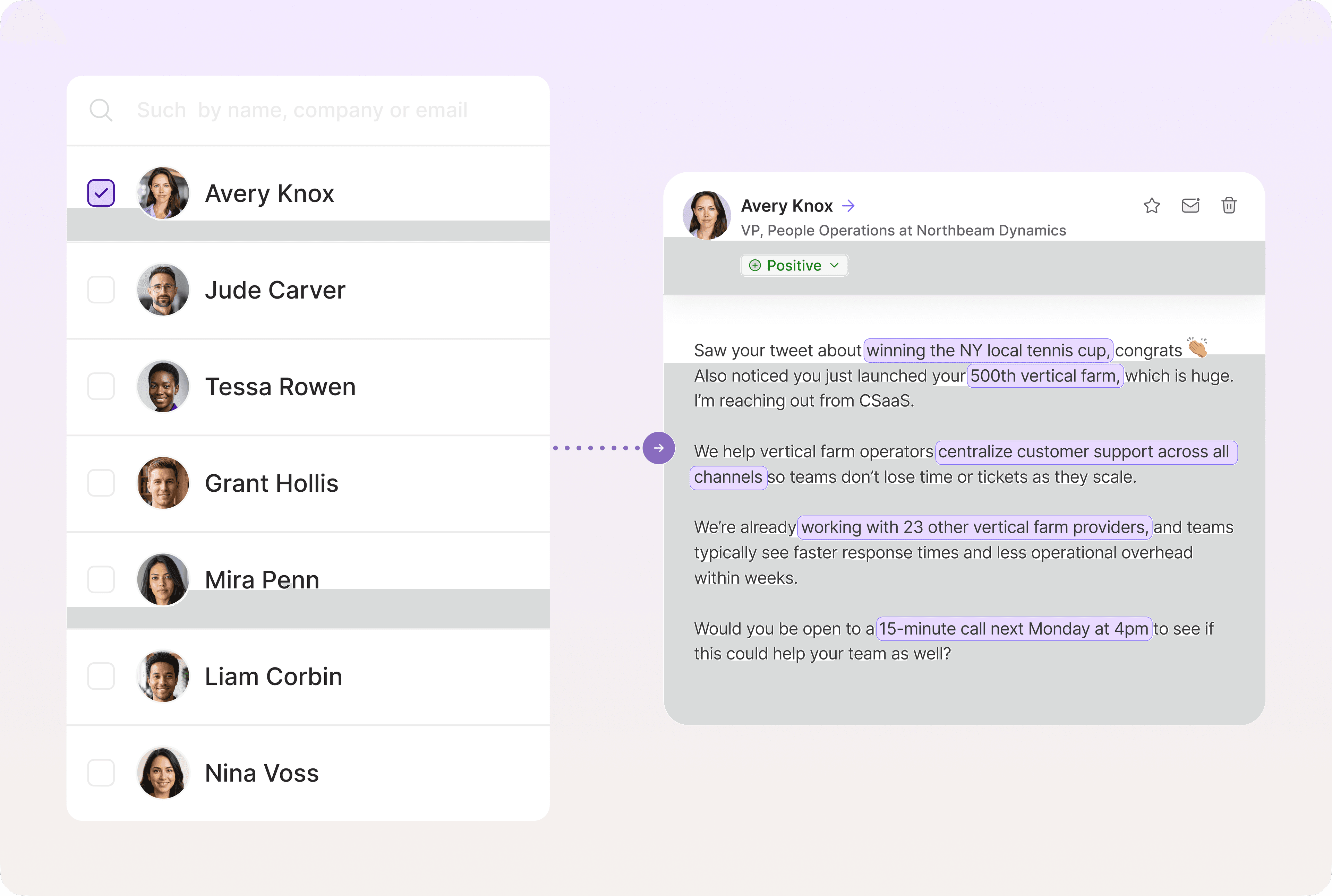
Send personalized emails at scale
Think AI emails mean generic communications? Think again. Ava searches the Artisan database to find lead data and uses it to personalize emails and social media outreach.
Track intent data on your website
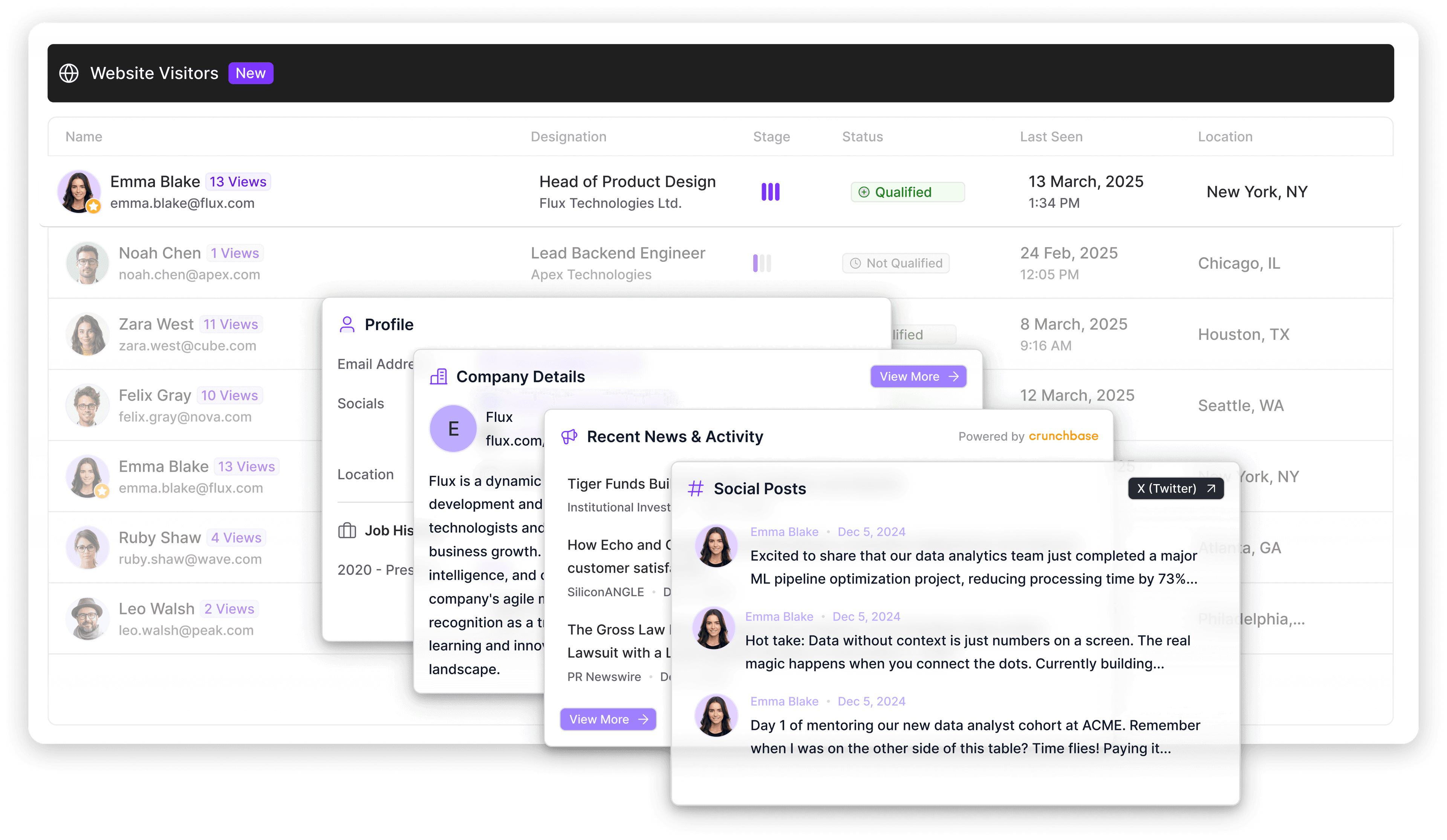
Leads that visit your website represent valuable sales opportunities. Artisan offers website visitor tracking that tells you who visited your website and when, giving you deeper analysis into intent. She can also trigger automated outreach to these accounts based on website activity.
Your event is only as strong as your pre-event emails
Your pre-event sequence is as important as the event itself. Without it, you’ll struggle to communicate the event’s value, inspire urgency, or convince potential attendees to attend.
The fastest way to improve results is to stop reinventing the wheel. Reuse proven templates, keep your landing page frictionless, and test small variables like subject lines, CTAs, and send times. You can then take your pre-event emails to another level by automating core processes with a tool like Artisan.
Artisan is an AI sales platform with a suite of powerful automation capabilities. With playbooks, deep personalization, and self-optimizing sequences, you can scale your outbound marketing at a fraction of the cost of expanding your sales team.
Automate your outbound with an AI BDR
Meet Ava—your AI BDR who handles prospecting, outreach, and follow-ups, so your team can focus on closing.

Marsha Dunn
SME @ Artisan
Marsha Dunn is a writer helping businesses connect with customers and build credibility. She specializes in B2B thought leadership rooted in expertise.