Marketing automation implementation guide
Learn how to implement marketing automation in B2B sales. Includes tools, templates, and real-world examples for lean SaaS teams.
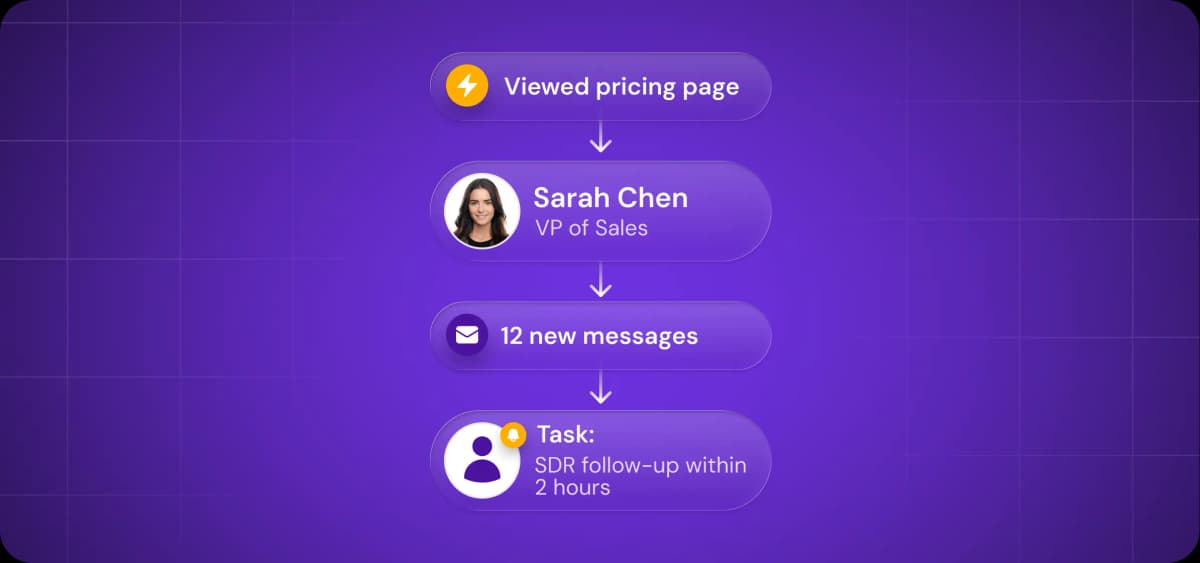
AI has changed what's possible with marketing automation.
Automated workflows have evolved beyond triggering emails on a schedule—they now handle the time-consuming research, personalization, and routing that used to require manual work.
But that creates a new problem: choosing what to automate and how. There are too many tools, too many features, and too many possible workflows.
What is marketing automation, and why does it matter?
Marketing automation is the process of handing over repetitive marketing tasks to technology.
You set up a workflow once, define the trigger and the action, and the automation system handles it on repeat. For example, you might specify that anyone who signs up for your free tool receives a welcome email immediately and a series of nurturing emails within a few days.
For years, marketers have been successfully automating the following routine activities:
Drip email campaigns
Retargeting advertising
Lead scoring
Transactional messages
Task assignments
In recent years, AI has fundamentally changed what's possible to automate and how it's done. That's why digital marketing automation is experiencing a resurgence.
You can already automate these complex tasks:
Communication personalization
Intent signal detection
Intelligent conversation routing
A/B testing at scale
The old playbook focused on executing predefined sequences. Now, it can handle multifaceted processes as well as (or in some cases better than) humans.
But there’s another important consideration. As AI automation makes its way into workflows, it becomes imperative that humans in the loop know when to trust AI with minimum input, when to provide detailed oversight, and when to take over fully.
Before you automate: Spot the gaps
To prepare the ground for automation, you first need to identify where manual work is costing you time, leads, or revenue. These gaps become your automation roadmap.
Where are you losing time and leads?
Audit your current workflows following these simple steps:
Shadow your team for a week and track repetitive tasks, such as data entry, list pulls, sequence setup, CRM updates, and prospect research.
Interview the sales team about friction points. Determine which tasks eat the most time, where leads fall through, what's done inconsistently, and where they lose track of who contacted whom.
Pull the numbers from your CRM. Include the average time from form fill to first outreach, the percentage of leads contacted within 1 hour vs. 24 hours or more, how many deals stall in each pipeline stage, and the amount of time reps spend on non-selling activities.
Document findings in a bottleneck table that shows current process, time or leads lost, and automation opportunities for each gap.
Bring together your workflow audit findings in a table like this:
Bottleneck | Current Process | Time/Leads Lost | Automation Opportunity |
Lead follow-up | Manual review of form fills, assign to rep, rep researches and drafts email | 24–48 hours, 30% of leads go cold | Auto-route qualified leads, trigger personalized sequence within 10 minutes |
Prospect research | SDR manually checks social media, company website, news | 10–15 min per prospect | Auto-enrichment pulls firmographics, recent activity, intent signals |
Duplicate outreach | No visibility into who's contacting whom | 15–20% of prospects get conflicting messages | CRM sync and suppression lists prevent overlap |
Pipeline stalls | Reps forget to follow up after demo | 40% of deals sit idle for 7 days or more | Automated task creation and lead nurturing sequences trigger based on stage |
Once you've documented your gaps, prioritize them. Rank each bottleneck by two factors: implementation effort (how complex the automation will be to build) and business impact (how much revenue it will save). Start with low-effort, high-impact optimizations.
But don't jump into implementation and software purchases yet. If you're looking at five different workflows, there’s a good chance you’ll need different tools or a platform that handles multiple use cases. Understanding your full scope of requirements and aligning your team before choosing software prevents you from outgrowing your stack three months in or paying for features you'll never use.
Align your team before the tech
Ensure alignment in three areas before you build anything:
Lead stages and definitions: What makes someone marketing-qualified vs. sales-qualified? What's the score threshold? Which actions (demo request, pricing page visit, email reply, etc.) trigger a stage change? Document this in a shared glossary that everyone references.
Handoff points and ownership: At what moment does a lead move from marketing to sales? Who owns follow-up at each customer journey stage? What happens if a rep doesn't respond within a certain number of hours? Map this in a flowchart that shows exactly when automation takes over and when humans step in.
Success metrics: What does "success" look like? Faster response times? A higher conversion rate? More qualified pipeline? Agree on what you're measuring so you can prove ROI and adjust as needed.
Build a shared reference document to act as your marketing automation implementation template. Include your glossary of terms, the lead lifecycle flowchart, routing rules, and agreed-upon metrics. This becomes the single source of truth when automation is switched on.
Choosing the right automation tools (without tool fatigue)
AI-powered tech is simultaneously a priority and the biggest headache for marketers, according to Salesforce's State of Marketing report.
Why it’s a priority is clear: technology keeps getting more capable, and you have to keep up. But why the headache? In The State of Martech 2025 (chiefmartech and Martech Tribe), it was reported that tech stacks keep expanding—the average tech stack grew by 2.2%—and as a result are becoming increasingly harder to manage.
The average marketing team now juggles over 10 platforms, creating the opposite of efficiency. To protect your budget, reduce tool-switching, and keep workflows functional, you need fewer tools.
Prioritize integration over fancy features
Integrations are the best way of avoiding tech stack inefficiency. Always pick marketing automation software that syncs with your CRM and doesn't need a full-time ops person to run.
Automation software should have the following core integration features:
Real-time, two-way CRM integration
Third-party tool connections
Zapier integration (or other automation platform)
API access for custom data sync
Here are three examples of automation solutions that integrate cleanly with CRMs:
Artisan: AI-led outbound with automated prospecting and personalized messaging
Mailmodo and ActiveCampaign: Email-first tools for nurture sequences and lifecycle marketing
HubSpot: All-in-one marketing automation platform with built-in CRM and service tools

Automate your outbound with an AI BDR
Meet Ava—your AI BDR who handles prospecting, outreach, and follow-ups, so your team can focus on closing.
Start with what you already have (and avoid point solutions)
Always thoroughly audit your current tech stack before adding new tools. In particular, check if your CRM and existing platforms already cover the marketing automation features you need: lead scoring, email sequences, task triggers, and basic enrichment.
If they do, use them. If they don't, resist the urge to patch gaps with point solutions. Adding five tools to compensate for what your CRM can't do creates more problems than it solves.
You most likely can replace three or four tools with one platform that handles multiple functions, such as customer management, AI-powered features, sequences, enrichment, and analytics.
Just remember to do your due diligence when evaluating all-in-one platforms. Few excel at everything. A tool with a comprehensive, verified email database might struggle with phone number accuracy. A CRM with robust pipeline management might offer only basic enrichment.
Evaluate where you need best-in-class capabilities versus where "good enough" works, then choose platforms that excel at automating your highest-impact workflows.
As far as outbound automation platforms go, few (if any) match the range of Artisan. AI BDR Ava autonomously handles lead research and qualification, message personalization, and campaign optimization.

Build your first workflow (then expand)
Avoid trying to build a 12-step sequence with branching logic, AI personalization, and multi-channel orchestration in one sitting. Implementing marketing automation starts with one proven workflow.
Build something straightforward first, and expand from there.
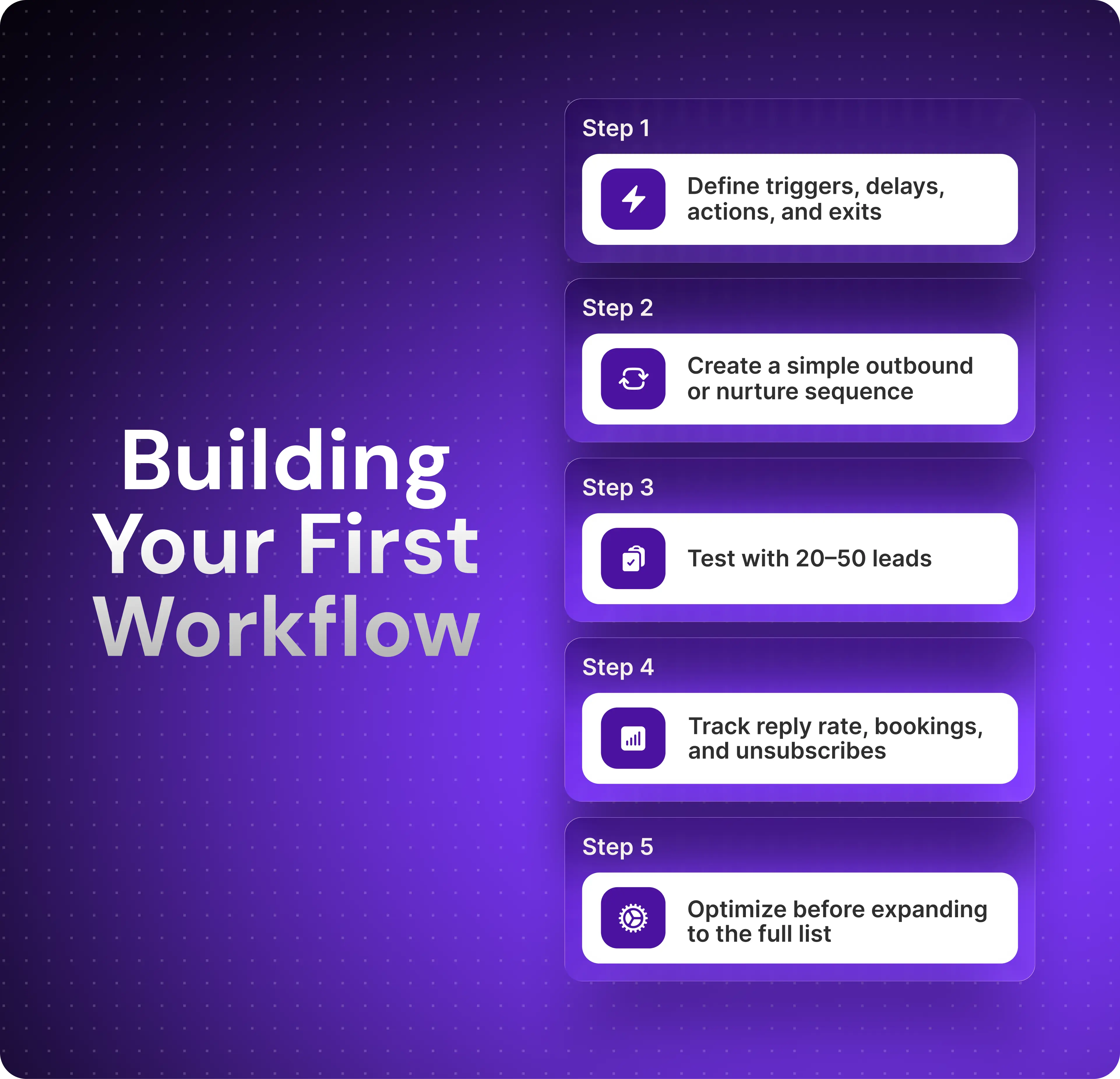
Map out your workflow first
It sounds obvious, but many marketers miss this step. Map out your workflow before you start building to ensure it works in theory. It then becomes your blueprint.
Here are the components every automated workflow requires:
Entry trigger: What event starts the workflow? This could be a form submission, lead score threshold, stage change, or a list import.
Delay or condition: Does the next step happen immediately or after a wait period? Is there a condition that must be met first?
Outreach step: What's the action? Will the automation send an email, create a task, send a social media message, or update a field, for example?
Follow-up logic: What happens based on prospect behavior? If there’s a reply, do they exit the sequence? If there's no open after three days, is it appropriate to send a reminder? If it bounces, should the email address be marked as invalid, or should another email be sent?
Exit criteria: When does someone leave the workflow? Common actions include booking a meeting, unsubscribing, or reaching the end of an outreach sequence without taking action.
Launch with an AI-enhanced nurture or outbound sequence
Salesforce found that 78% of surveyed marketers use marketing automation tools to improve outreach. And it’s obvious why they’re turning to these tools. Outreach automation is straightforward to build and easy to measure.
Traditionally, outreach was rule-based and mechanical—send email, wait three days, send follow-up email. However, with AI in the picture, it’s now possible to automate the decisions that used to require manual work. AI can determine who to target, what to write, and how to adapt based on engagement.
Here’s an example of an AI-based cold outbound sequence for generating new leads:
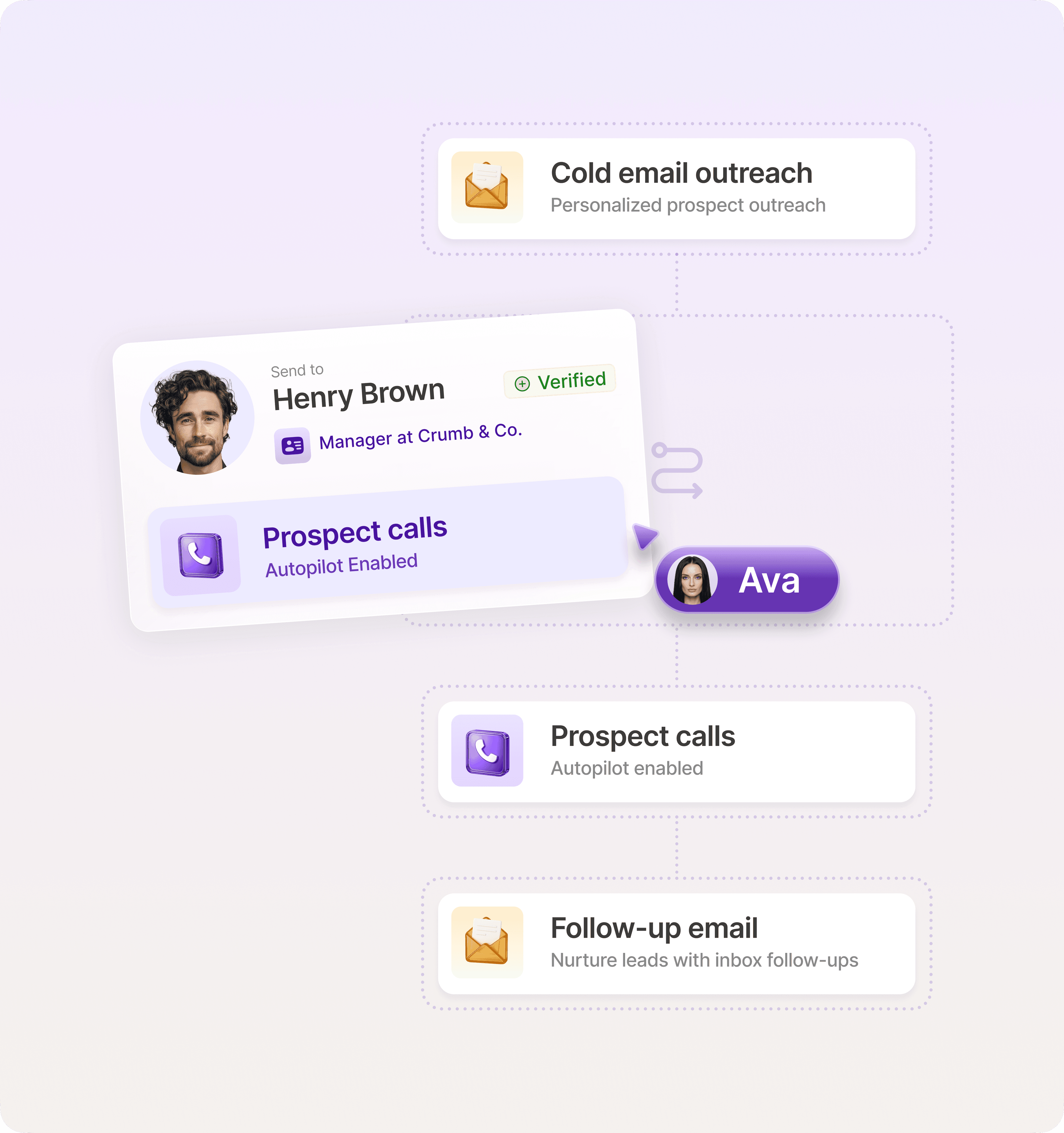
Trigger: AI searches for prospects that match your ICP criteria (company size, industry, demographics, tech stack, and recent signals like funding or hiring) and adds them to the CRM.
Day 0: AI enrichment pulls company data, recent news, tech stack information, and hiring patterns. It then drafts a personalized email referencing their situation.
Day 3: The automation sequence sends a social media connection request with a brief note.
Day 5: AI generates and sends a follow-up email, adapting tone based on engagement signals
Day 8: One last email is sent to the lead, specifying that there will be no further social media or email contact.
Exit: If the prospect replies at any stage, they are routed to a rep. If they reach the end of the sequence without replying, they are removed from the active lead list.
Most marketing strategies consist of both inbound and outbound lead generation. Marketing automation is also effective at nurturing prospects who have found you first.
Here’s an example of an automated nurture sequence for inbound leads:
Trigger: Prospect signs up for a webinar
Day 0: An automated confirmation email with webinar details or content delivery is sent.
Day 2: An AI agent selects and sends a relevant case study based on the lead’s industry, company size, and what they downloaded or their webinar attendance.
Day 5: AI crafts a follow-up email requesting a meeting. If the lead agrees, a calendar link is automatically sent.
Exit: If the prospect replies at any point, they are routed to a rep. If they reach the end of the sequence without replying, they are moved to a softer nurture sequence or the company newsletter.
Both workflows use straightforward triggers, minimal branching logic, and clear success metrics. You'll know quickly whether they're working or not.
Test with a small batch
Don't run new automations against your entire lead database. Start with a limited audience segment (20–50 leads) and run the workflow for one complete cycle. A test phase reveals what's working and what's breaking before you scale.
Look for the following issues when testing:
Timing problems. Watch how engagement changes at each step to find the right rhythm. If prospects aren't opening emails or engagement drops sharply after the third day, your cadence is probably off.
Broken triggers. Check that emails are firing on schedule and tasks are being created when they should. More importantly, verify that your conditional logic works—if a prospect replies, they should exit the sequence immediately, not receive three more automated emails.
Low engagement. The average email open rate is 43.46%, according to MailerLite’s benchmark data. If yours is well below that number, there may be subject line or sender reputation issues. Click-through rates under 2% often mean your messaging, targeting, or offer needs work.
In particular, track the metrics that indicate workflow health: reply rate, meetings booked, and unsubscribe rate. These tell you whether you’re ready to roll out an automation or need to run more tests.
Make it stick: Scaling the process
When your first workflow proves the concept, the temptation to automate every edge case will be strong—we’ve been there. That's how you end up with 47 sequences, none of them optimized, and a team that can't remember which automation does what.
Here’s how you intentionally prevent that mess.
Automate what works, not what’s flashy
The 80/20 rule dictates that 80% of your pipeline will come from 20% of your effort. In automation terms, that means 20% of your sequences will drive most of your results.
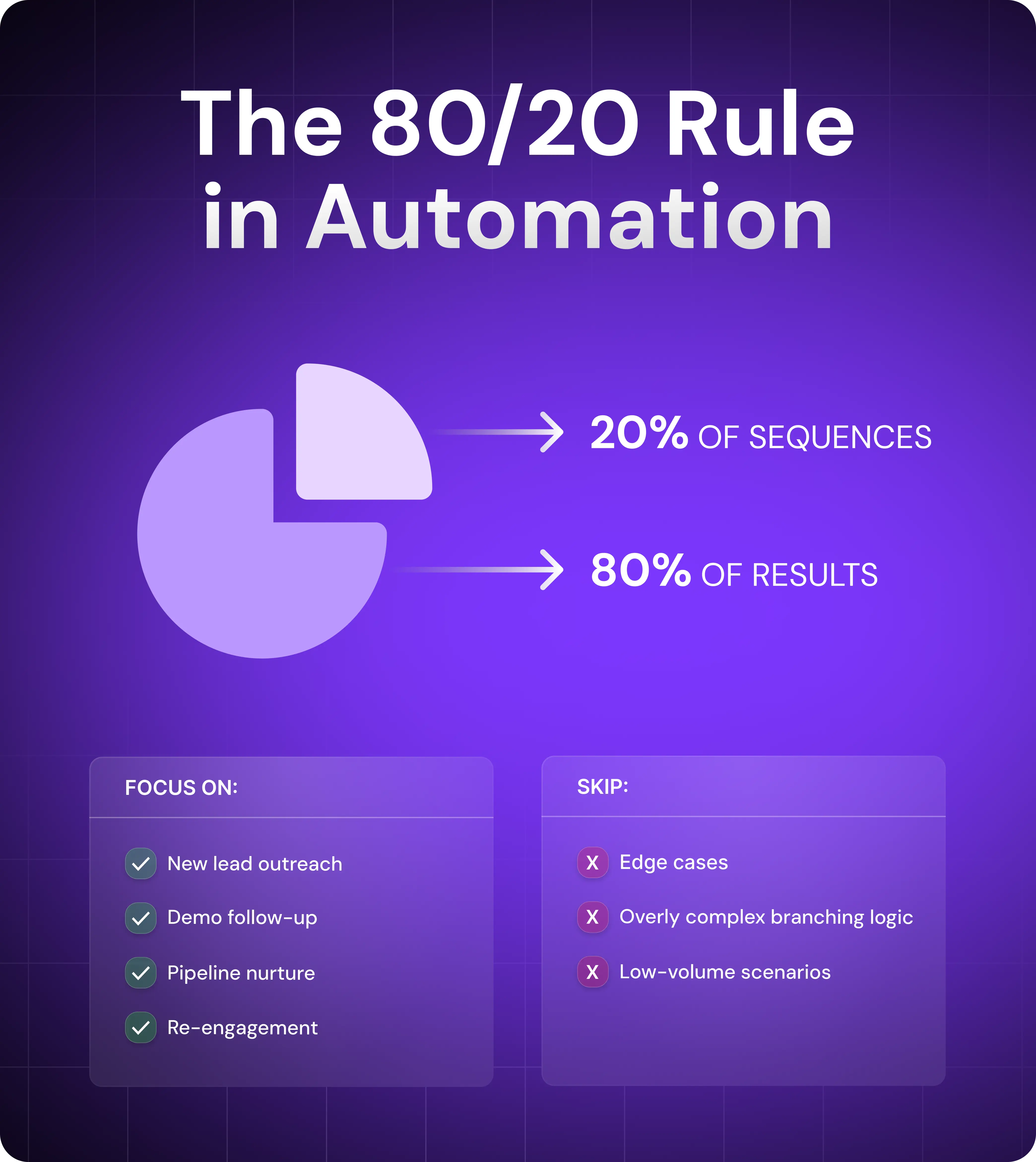
Focus on the workflows that handle your highest-volume, highest-impact activities—new lead outreach, demo follow-up, pipeline nurture, and re-engagement. Build those well. Optimize them. Let them run.
Resist automating edge cases. If a scenario happens once a month, handle it manually. If you're adding five conditional branches to account for one prospect type, you're overcomplicating things.
Build an internal playbook
Documenting what you've built in a clear, centralized document will ensure alignment between teams and create a single source of truth for onboarding, optimization, and troubleshooting.
Your reference guide should include all of the following:
Active sequences: What each workflow does, who it targets, and when it triggers
Naming conventions: How you label sequences, tags, and custom fields so anyone can understand them at a glance
Owner roles: Who's responsible for monitoring performance, making updates, and handling escalations
Build in human touchpoints
Always include handoffs for when automation should stop and a sales rep should take over.
The whole point of automation is to free up team members so they can focus on conversations with the right prospects at the right time. Your workflows should recognize those moments and hand off to humans automatically.
Here are three examples of common handoff scenarios:
When a prospect clicks your pricing page, create a task for an SDR to reach out immediately.
When someone opens two emails without replying, trigger a social media outreach task for a personalized connection request.
When a demo gets booked, remove the prospect from all automated sequences immediately and route to an AE to prep for the call.
Artisan blends the most advanced AI outreach technology with a platform that’s designed for fast, straightforward human handoff. You can run personalized email and social media sequences that automatically route leads to reps when they respond positively to a message.
Final checklist for smart marketing automation
Almost ready to roll out your automation? Great. Before you hit play, here’s a final list of tasks to give it the best possible chance of succeeding.
Clear goals tied to sales metrics: Create a weekly or monthly report template that includes reply rates, meetings booked, and pipeline contribution.
Tools that integrate with your existing stack and centralize customer data: Test automation tools to make sure they sync cleanly with your CRM, enrichment platform, and communication channels.
Playbook documenting what's been automated and why: Document active sequences, triggers, logic, and ownership.
Review loop for updating copy, timing, and logic monthly: Schedule monthly reviews to refresh subject lines, adjust timing, and refine targeting.
Team trained on spotting and escalating real-time opportunities: Train your reps so they know what high-intent signals look like and how to act on them immediately.
Scalable infrastructure that grows with your marketing campaigns: Choose platforms that won't hit volume limits or require expensive upgrades as your contact list and sequence complexity increase.
Build one workflow that proves the ROI
Getting started with automation is often the hardest part, especially if there’s uncertainty around costs in your organization.
If this is the case, begin by automating your outbound workflow. It's where manual work hits hardest—prospect research, personalization, and multi-channel follow-up—and ROU is easy to demonstrate.
Artisan handles the entire outbound process from one platform. AI BDR Ava autonomously finds prospects that match your ICP, researches their online behavior, drafts personalized emails, and follows up across email and social. She allows reps to cut their time spent on time-consuming busywork all while scaling to a level that was previously inconceivable.
Automate your outbound with an AI BDR
Meet Ava—your AI BDR who handles prospecting, outreach, and follow-ups, so your team can focus on closing.

Adelina Karpenkova
SME @ Artisan
Adelina Karpenkova is a writer helping businesses tap into AI's potential and clear up misconceptions. She works with B2B teams on latest industry knowledge.