LinkedIn InMail best practices: Get more replies
Master LinkedIn InMail best practices to reach decision-makers, write effective messages, and generate more leads with smarter outreach.
"I want to receive more InMails," said no LinkedIn user, ever.
As budgets tighten, cold outreach volumes are climbing. Your prospects are drowning in pitches. You'll either add to the pile of ignored messages or join the small percentage that get responses.
This guide shows you how to be in that second group.
Before You Hit Send: Set the Stage for High InMail Response Rates
If you listen closely, you can probably hear someone right now typing an InMail to the wrong person. A solopreneur getting pitched enterprise software. A bootstrapped startup receiving outreach for Fortune 500 compliance tools.
High response rates start with hyper-targeted campaigns.
Know Exactly Who You’re Messaging (Define Your Real Target Audience)
To send your InMails to the right people, you need to understand three distinct buyer roles: who feels the pain, who has authority to buy, and who controls the budget.
Keep these rules of thumb in mind when picking your targets:
While the person feeling the pain is closest to the problem, and it’s easier to get through to them, they aren’t usually final decision makers.
The decision-maker has the authority to evaluate vendors and make recommendations, usually to a VP or director who owns the function.
The budget holder controls spending and final approval—sometimes they are the decision-maker, sometimes they’re a level higher.
Who you should target depends on deal size. For smaller deals, focus on the person who feels the pain most acutely and can buy. For complex enterprise sales, start with somebody who is close to the problem but can also champion your solution internally.
Once you’ve identified possible points of contact, filter by the following:
Job title and seniority: What role does this person hold, and can they act on your solution?
Company size: Are you targeting twenty-person startups or enterprises?
Intent signals: What visible events indicate pain right now—funding rounds, leadership changes, expansion announcements, hiring surges?
Once you know who you're looking for, you need a way to find these prospects.
One way to do this is with LinkedIn Sales Navigator. You can apply filters to look for leads based on seniority, function, headcount, geography, and industry. When a criterion is met, Sales Navigator alerts you and surfaces the prospect in your feed.
Another option is to fully automate lead research and enrichment with a tool like Artisan. The platform is built around AI BDR Ava, who identifies accounts that match your ideal customer profile (ICP) from an internal database of over 300 million leads and provides you with enriched, detailed lead profiles.

Warm Up Prospects Before Cold Outreach
The warm-up process involves three simple steps:
View their profile.
Send a connection request
Like and comment on their posts.
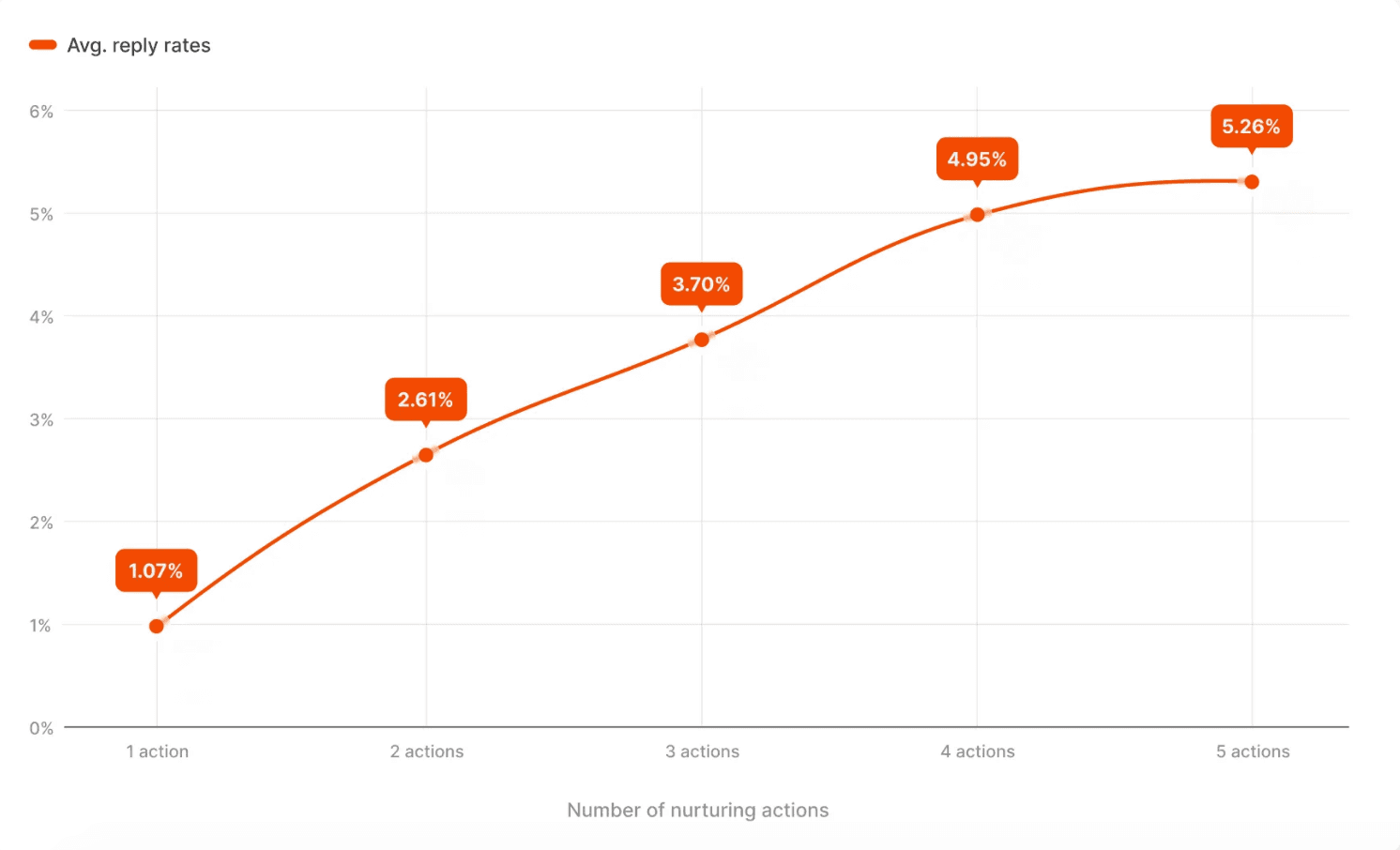
Warming prospects up before you message them is proven to lift InMail responses. Research from Belkins and Expandi found that pre-outreach nurturing increases response rates by five times.
Crafting an InMail That Gets Opened (Subject Lines and First Impression)
LinkedIn displays your InMail subject line in the preview notification. If you skip the subject line, recipients will see the first line of your message, which might not be particularly attention-grabbing.
Write a Compelling Subject Line That Actually Gets Read
General advice is to keep subject lines under 40 characters so your message doesn't get cut off. In practice, unless your InMail is sponsored (in which case "Sponsored" appears first in the subject line), the preview can fit 50 to 56 characters.
Test different angles if you're sending at scale and track which ones drive better open rates:
Hint at value without revealing everything. E.g., “Idea for {{Company Name}}”.
Tie the subject to their world. E.g., “Question about {{Pain Point}}”.
Use their company name, role, or a detail specific to them. E.g., “Saw your post on sales automation”.
Cut to the chase and put the essence of your offer right there. E.g., “3 Ways to cut onboarding time”.
Optimize Your First Two Sentences
Use what you spotted during warm-up to personalize your opening line: the job post they shared, the milestone their team hit, or the mutual connection you discovered.
Avoid weak, generic openings such as:
"I hope this finds you well."
"I wanted to reach out and introduce myself."
"I have a solution that can help your business."
Skip the intro and reference something specific:
"I noticed [Company Name] just raised a Series B—congrats."
"Saw your comment on [Topic]—completely agree about [Specific Point]."
"[Mutual Connection] mentioned you're leading the expansion into [Market]."
Personalize Your LinkedIn InMail Message at Scale
Attribute-based personalization—first name, company name, job title—is the baseline now. Prospects expect it. However, to stand out at scale, you need AI-driven personalization.
Move Beyond Name-Only Personalization
Here's how AI personalization tools tailor your outreach to individual recipients:
References shared experiences, such as previous attendance at the same conference or similar industry challenges.
Mentions industry trends happening in their sector right now, like GDPR enforcement ramping up or new compliance requirements.
Call out recent activity, like a post they shared, a comment they made, a job opening they posted, or a milestone their company hit.
Identifies relevant pain points for their specific role, like pipeline velocity for VPs of Sales or technical debt for CTOs.
You can do this manually, but it takes more time and will likely be less nuanced. On top of that, AI personalization drives better reply rates. In joint research by Belkins and Expandi, AI-assisted campaigns saw a first message reply rate of 4.19%, compared to 2.60% without AI—a 61% lift on the first touch.
Use InMail Templates, but Customize Them
If you don't want to go all in on AI, use a template that follows your voice and plug in the personalized details AI tools surface. You control the tone and structure while AI handles the research.
Here's a template built around job opening signals:
Subject: Operations optimization for [Company Name]
Hi {{First Name}},
Noticed you're hiring for {{Role}}. Have you been struggling with {{Specific challenge based on role}}?
We help teams set up automated workflows that double output without adding headcount. {{Company in their niche}} has increased their pipeline by 45% with our agents.
Would you be interested in learning about our approach?
Regards,
{{Your Name}}
The placeholder {{Specific challenge based on role}} is where you insert the AI-surfaced insight based on their situation.
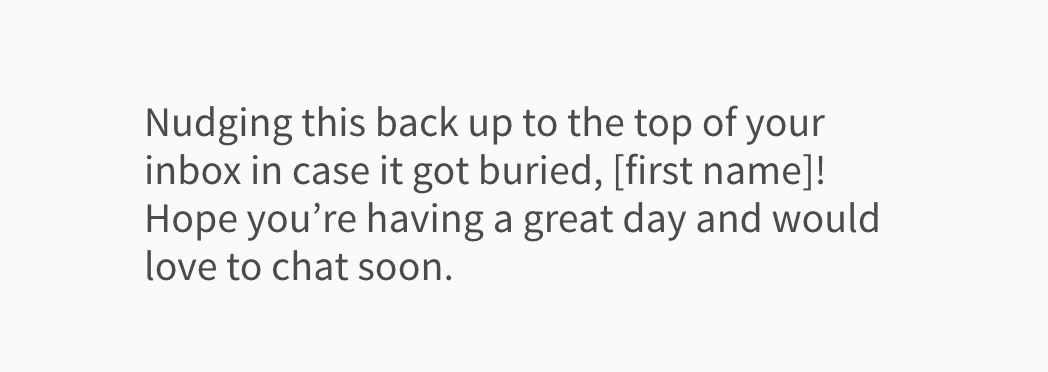
Templates become even more critical for follow-ups. Belkins and Expandi found that manual messages (created with a template) performed better than AI when used for follow-up.
LinkedIn also offers helpful InMail follow-up templates, like this one:
Keep Your InMail Short, Clear, and Valuable
You don’t have much time (or space) to make a strong first impression. Prospects decide whether to engage in seconds, so every word needs to earn its place.
Shorter InMails Win: Write Like a Human, Not a Salesperson
Keep InMails under 150 words. You don't need to send your full pitch in the first message.
The goal is to start a conversation—sales come later. To encourage prospects to engage, write like a human talking to another human.
Here's an InMail from my inbox that stands out:
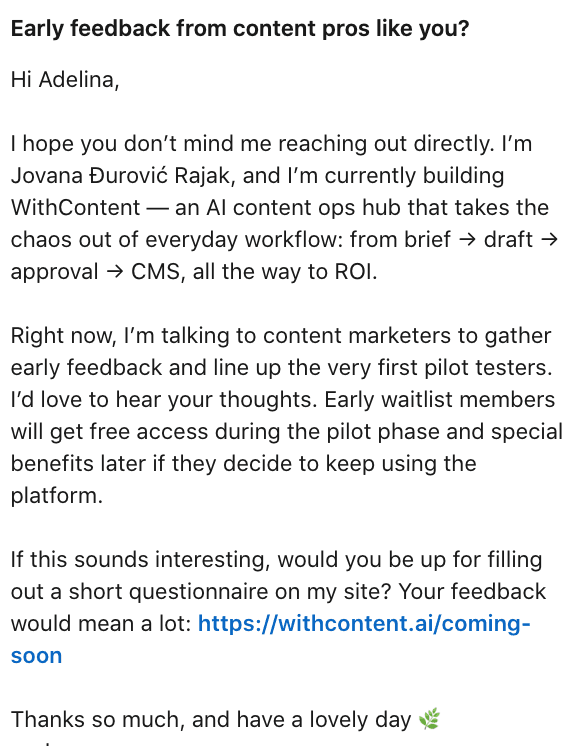
Here what makes this example a good InMail message:
The subject line is clear and specific, with a little flattery sprinkled in.
The first paragraph explains what the message is about and why it's relevant to my industry.
The second paragraph covers what's in it for me.
The CTA is clear and low-friction.
Best of all, there is no corporate jargon.
Keep in mind, however, that this particular example doesn't involve high-ticket sales. For complex B2B deals with longer sales cycles, you need a nurturing sequence—multiple messages, each with their own CTA—that gradually builds trust before asking for a meeting.
Make Your CTA Obvious and Low-Friction
A direct link to book a meeting rarely works in the first message for offers with long sales cycles.
Instead, your CTA should open a conversation that warms them up and then naturally leads to a call later.
Here are CTA ideas that work for first messages:
“Would you like to learn more?”
"How are you handling {{pain point}} right now?"
"Is this a priority for your team this quarter?"
"I put together a quick breakdown of how teams in {{industry}} are approaching this—want me to send it?"
"Saw you're expanding into {{market}}—curious what tools you're using to scale outreach?"
"Would love your take on this approach—does it align with how your team works?"
Research by Gong shows that “interest questions,” where you give leads the option to learn more, are most effective at generating responses. Once they reply, your next message can suggest a call.
Nail the Timing: When to Use InMail for Maximum Response
Timing won't save a bad message, but it affects visibility. Your message is much more likely to be opened if it’s sitting at the top of your recipient’s inbox when they log in.
Send at the Right Time of Day and Week
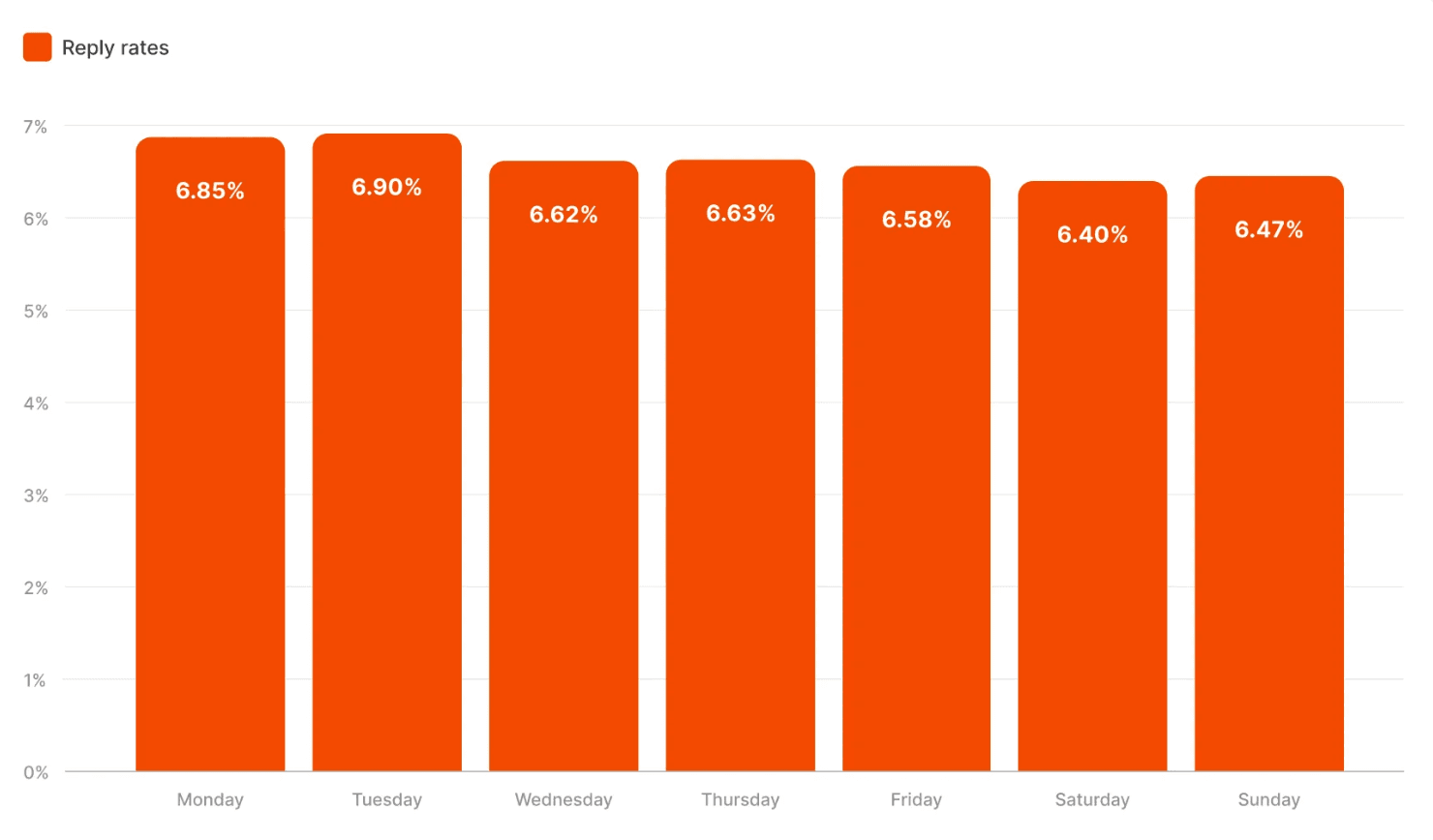
Belkins and Expandi have shown that Tuesday is the best day to send InMails, with an average reply rate of 6.90%, followed closely by Monday at 6.85%. Reply rates drop steadily through the week (though not dramatically), with weekends seeing the steepest decline.
As for the time, if there was an ideal slot, it would quickly become the worst time due to inbox saturation. Just make sure to send your messages during the workday when prospects are at their laptops. Sending at night signals a lack of personalization, and your message will likely get buried under the pile of InMails that arrive by morning.
As a general rule, aim for 9:30 AM to 1:00 PM in the prospect's local timezone, or around 4 PM to 5 PM before their day ends. Skip Monday mornings—people spend the first part of Monday catching up, and new InMails are often postponed or forgotten.
Leverage Automation Without Losing Your Personal Touch
Uh-oh, sending those InMails to prospects across time zones? Let social media automation handle that.
LinkedIn only supports native scheduling in Recruiter, and it doesn't make sense to take out a plan solely for that feature. But there are third-party automation tools that let you set up timezone-adjusted LinkedIn outreach.
Follow Up (Most InMail Replies Don’t Come From the First Message)
Only a fraction of your leads will reply to your first InMail message. The rest will come from follow-ups.
There is a caveat, though. You can’t keep following up endlessly. The data shows that follow-ups work to a point. Research by Belkins on email follow-ups found that reply rates drop with each additional message—from 8.4% on the first follow-up email to 5.8% by the fourth. There’s a strong chance that a similar principle applies to InMails.
You might think, "Lower reply rates aren't a big deal—I'm still getting more total replies." But there's a hidden cost. Sending over four emails in a sequence more than triples unsubscribe and spam complaint rates. And on LinkedIn, prospects can block you, report you, or mark your messages as inappropriate.
The solution? Mix channels.
Build a Light, Multi-Touch Follow-Up Strategy
Cap your InMail sequence at 2 to 3 messages, then complement it with cold email. Send one InMail, follow up with an email, and circle back with another InMail if needed.
Here’s an example of a multi-channel sequence:
Day one: A personalized InMail message and soft question
Day four: An email referencing your InMail and a CTA with a slightly different question
Day eight: An InMail message with a different angle or reference to recent activity
Keep each follow-up short and change your angle. Don't send something generic like "Just following up on my last message." Reference something new—a piece of content, a different pain point, or recent company news.
In addition, vary your CTAs across messages. For example, if your first InMail asked a question, your email follow-up could offer a resource or case study.
Use Trigger-Based Follow-Ups
A regular follow-up cadence runs on a fixed schedule. Trigger-based follow-ups activate based on specific actions or events.
There are two scenarios where trigger-based follow-ups make sense.
Scenario 1: Using intent signals during your sequence
A prospect opens your InMail but doesn't reply. But they’ve visited your website, checked your pricing page, and clicked a link you sent. These are all signals to follow up immediately with a simple message like "Saw you checked out our pricing—curious if you have questions about how it fits your setup?"
Scenario 2: Re-engaging cold leads after major changes
A lead might not be ready to engage now but could be later. Add them to a trigger-based sequence that activates when something significant happens, like a job change, funding round, new hire, or company expansion.
Prepare templates for these kinds of events to re-engage your leads promptly. For example, you might send a message like "Congrats on the VP promotion. Are you rethinking your tech stack as you build out the team?" or "Saw you're hiring for {{role}}. Guessing {{pain point}} is top of mind right now?"
Optimize Your LinkedIn Profile to Improve Acceptance Rates
Prospects check your profile before deciding whether to respond. That’s why it needs to back up what you're saying and demonstrate you’re worth talking to.
Your Profile Must Look Credible Before You Send InMail
Before you start sending InMails, follow this profile optimization checklist:
Add a profile picture where you are clearly visible. Research shows that a smile and professional attire elicit the best responses.
Use a background banner that shows what you do—include your value prop, drop some client logos, and top it all with your company’s brand design.
Fill the About section with who you help, what problems you solve, and why it matters.
Pin case studies, testimonials, or relevant content to the top of your profile.
Request recommendations from colleagues and loyal clients.
Align Your Profile With Your InMail Campaign
Too often, I get messages from people whose LinkedIn description doesn't match their headline or the pitch they're making. This tiny detail is enough to kill the credibility of the entire message.
Your profile and InMail need to tell the same story. If your message talks about solving a specific problem, your headline and About section should immediately confirm you're qualified to solve it. "Helping B2B companies automate outbound sales" is clear. "Growth enthusiast | Marketing maven | Coffee lover" is not.
Boost Performance Through Testing & Optimization
Sending the same message to everyone and hoping for the best is a waste of InMail credits. What works for one audience might fall flat for another, and the only way to know is to test, measure, and refine.
A/B Test Subject Lines, Templates, and CTAs
Pick one variable to test at a time. If you change the subject line, message length, and CTA all at once, you won't know what drove the result.
Start by A/B testing your subject lines. Here are some examples you can use as inspiration:
Length: Short (under 40 characters) vs. specific (50 to 56 characters)
Tone: Urgency vs. casual—e.g., Limited spots for Q1 implementation vs. Idea for {{Company}}
Format: Question vs. statement—e.g., Curious about {{Pain Point}}? vs. Solution for {{Pain Point}}
Personalization: Company-level vs. individual—e.g., Idea for {{Company}} vs. Congrats on your promotion to {{New Position}}
Move to message structure once you've nailed the subject line.
Here are three testing ideas for your template:
Short (three sentences) vs. longer (six sentences)
Bullet points vs. paragraphs
Question format vs. statement format
When it comes to CTAs, here are three common angles to experiment with (with examples):
Question vs. link: Want me to tailor this for your exact use case? vs. Click to see an recent case study from a client in your industry
Direct meeting invite vs. softer engagement: Worth a 15-minute call? vs. Curious if this is relevant to your team?
Action-oriented vs. permission-based: Let's discuss your approach vs. Open to hearing how we approach this?
Analyze Engagement to Refine Future InMail Campaigns
You can only optimize if you have access to the right data. Fortunately, setting up tracking infrastructure for cold outreach—including InMails—is relatively straightforward. Tracking just a handful of metrics will show you where to direct your attention.
These metrics tell you which A/B test variations are performing best:
Open rate shows which subject line variation performs better.
Reply rate reveals which message structure and tone resonate most.
CTA conversion indicates which call to action drives higher response rates.
Follow-up performance tells you when reply rates drop off and which channel (InMail vs. email) works best for follow-up.
Track these metrics by segment and use the data to inform your next round of tests and refine your approach for each audience. What converts enterprise prospects might fall flat with SMBs.
The shift to AI-powered analysis
More than 40% of tech companies surveyed by Strategy have already deployed AI-powered analytics agents. These tools generate insights through automated data analysis, eliminating the need for you or your team to dig through dashboards to make sense of lead behavior.
Leave Them Clicking “Reply,” Not “Delete”
With the rise of AI, sales reps are increasingly turning to AI to automate significant parts of the outbound process—from initial prospecting right through to the handover of interested recipients to human account executives (AEs).
Artisan is one of the leading players in this new category of AI tools. AI BDR Ava, an autonomous sales rep around whom the platform is built, handles all of the early and middle stages of the outbound sales cycle—autonomously and at scale. Simply define your audience, pain points, and pitch, and she executes email outreach end-to-end.

Automate your outbound with an AI BDR
Meet Ava—your AI BDR who handles prospecting, outreach, and follow-ups, so your team can focus on closing.

Adelina Karpenkova
SME @ Artisan
Adelina Karpenkova is a writer helping businesses tap into AI's potential and clear up misconceptions. She works with B2B teams on latest industry knowledge.