GTM systems explained: How to build one that drives revenue
Learn what GTM systems are, how they work, and how to build one that connects data, automation, and outreach into a repeatable revenue engine.

You might have designed a GTM strategy that looks airtight in your deck. Yet the moment execution begins, parts of the system start to break.
Common symptoms include messy CRM fields, stale lead data, slow handoffs, and glitchy workflows. None of these show up in the strategy deck because broken execution is a GTM system problem, not a strategy problem.
The good news is that it's fixable.
What is a GTM system?
A go-to-market (GTM) system is the operational architecture behind how a company takes its product to market. It connects your ideal customer profile (ICP), data, channels, tools, workflows, handoff processes, automations, and reporting into one repeatable revenue engine.
In plain English, it is how your GTM strategy runs without relying on hero reps, Slack reminders, and someone in RevOps manually fixing everything on Friday afternoon.
A GTM system is usually owned jointly by RevOps, sales leadership, and marketing leadership. RevOps are responsible for the operating layer, sales for execution quality, and marketing for demand inputs, positioning, and campaign signals. Founders or chief revenue officers (CROs) own the commercial direction.
GTM system vs. GTM strategy
A GTM strategy covers your positioning, ICP, messaging, pricing, marketing mix, and revenue motion. It defines where you play and how you win.
A GTM system turns those decisions into daily execution. It covers the tools, data flows, automations, leading routing rules between marketing and sales, CRM updates, reporting, and feedback loops that make the strategy usable at scale.
A strong strategy can still stall if the underlying system is weak. The market can be right and the messaging can be sharp, but pipeline can still leak if reps work from bad data and are unsure which signal should trigger which action.
What does a GTM system actually include?
A GTM system covers every operational layer that moves a target account to closed-won revenue. Each layer feeds the next, so a weak link upstream can create problems downstream.
Here are the core parts of a GTM system:
ICP rules that define which leads enters the motion
Data sources and enrichment workflows that keep account and contact records usable
Signal capture from website visits, funding events, hiring activity, product usage, CRM changes, content engagement, and other buying indicators
Outreach and engagement workflows that define what happens when a signal appears
CRM architecture that records marketing and sales activity, ownership, sales stages, conversion metrics, and pipeline impact.
Lead scoring and routing rules that determine which account goes where, when, and to whom
Handoff triggers between business development representative (BDR), account executive (AE), customer success, and leadership workflows
Analytics loops that show which categories of leads are converting, which are stalling, and what might need to be changed
Why most GTM systems break down
Most GTM systems don’t work because they grow reactively, not by design. A team adds one tool for enrichment, another for sequencing, another for intent, another for reporting, and so on. The result is almost always the same: tech bloat without any improvement in performance.
Tool sprawl without integration
Salesforce's 2026 State of Sales report found that only a third of sales teams use a single all-in-one platform. The rest use a mix of standalone tools, averaging 8 tools per team, and 42% of sales reps say they are overwhelmed by too many tools.
Tool sprawl happens when every department (and even separate functions within a department) buys software for its own workflow without thinking about how data flows across the entire GTM system. Each disconnected tool creates a new data silo, a new admin surface, and a new failure point.
Weak ICP definition upstream breaks execution downstream
Your ICP is the first system input. If your ICP is vague or general, the risk of poor leads entering your marketing and sales flows increases, and this can have knock-on effects across your whole system.
For example, if a company’s ICP is "mid-market SaaS," reps will likely pull overly broad lists. Enrichment will bring back irrelevant account details, scoring will reward weak signals, and outreach, no matter how specific, will fail to resonate because of poor product-lead fit. The pipeline will grow, but conversions will worsen.
A loose ICP makes it harder to identify the right accounts. Sales automation should only come after ICP clarity. Otherwise, you’ll simply scale a faulty system.
Manual handoffs slow the pipeline
One of the most difficult handoffs in many GTM systems is from BDR to AE. A typical pattern looks like this: the BDR receives a reply, qualifies the account, drops notes into the CRM, tags the AE in Slack, and waits.
The lead then sits unworked, going cold because the follow-up is delayed.
A working GTM system is based on clear handoff triggers, ownership rules, service-level agreements (SLAs), CRM stage updates and notifications, next steps, and fallback paths. Handoffs cannot depend on whether someone saw a Slack message.
What a broken vs. high-performing GTM system looks like
Here’s an overview of the key differences between broken and healthy GTM systems:
A broken GTM system | A healthy GTM system |
Reps build their own lists because they do not trust the database or the prospecting automation workflow. | ICP rules control who enters the motion. |
CRM fields are incomplete, outdated, or filled differently by each team. | Enrichment happens automatically before reps act. CRM updates happen in the background. |
Leads move slowly because routing depends on manual review. | Routing happens based on fit, behavior, territory, and ownership. |
Sequences run on fixed timing instead of buyer behavior. | Signals trigger specific workflows. |
Reporting shows activity, but leadership still cannot explain which activities create pipeline. | Analytics show conversion by segment, channel, signal, rep, and stage. |
RevOps spends too much time cleaning up workflows instead of improving conversions. | Closed-won data feeds back into ICP, scoring and messaging. |
The core components of a high-performing GTM system
Think of a GTM system as six connected layers: ICP, data, engagement, CRM, routing, and feedback. Each layer depends on the one before it. When one is misconfigured, the system either breaks with it or keeps running and produces a poor pipeline.
ICP and segmentation are the foundation
ICP and lead segmentation decide who receives attention. This layer should define account fit by industry, company size, revenue, geography, growth stage, hiring patterns, tech stack, and trigger events.
Your ICP should also include exclusion rules, because bad-fit accounts cost money at later stages of the sales cycle.
Always be specific. State which companies, in which stage of growth, with which operating pain, using which tools, and showing which intent signals belong on your target list.
Data infrastructure and enrichment
Clean, enriched contact data is the fuel for nearly every downstream workflow. Bad data can lead to bounced emails, wrong routing, irrelevant personalization, duplicate records, and inaccurate reporting.
Real-time enrichment, powered by AI tools, can keep CRM records up to date as accounts change. For example, Artisan, which is powered by an autonomous AI BDR called Ava, enriches prospects using more than 20 data sources and prioritizes them with intent signals such as funding rounds and leadership hires.

Outreach and engagement workflows
Outreach workflows start running after a buyer or account shows enough fit or intent to warrant direct targeting. Strong workflows initiate based on specific behavioral signals.
The following signals are common triggers:
Pricing page visit
Decision-maker job change
Hiring surge
CRM field change
Product usage shift
Funding round
Relevant content engagement
The type of outreach that is triggered by these actions will depend on lead readiness and value. Medium-value accounts that only just pass the intent threshold, for example, may be enrolled in an automated sequence. High-value targets that are likely eager to buy will be flagged for direct AE outreach.
CRM as the system of record
Your CRM should act as the single source of truth for all lead-related activity and automation steps.
Manually tracking every CRM field becomes impossible beyond a certain stage of growth. That’s why it’s essential to automate field updates and activity logging to reduce rep admin work and protect reporting quality.
The broader payoff is a clear view of which signals and automations create qualified meetings and which meetings become pipeline.
Lead scoring and routing logic
Manual scoring and routing create delays. In a modern GTM system, scoring logic should be automated and explicit enough that a hot account moves quickly and without any debate between marketing and sales.
Scoring should combine firmographic fit, behavioral signals, intent data, engagement quality, and historical conversion patterns. Routing logic must clearly define what happens with a lead that crosses a threshold. A high-fit account with strong buying signals should be automatically routed to a BDR or AE.
Analytics and feedback loops
Analytics show whether a GTM system is producing revenue. Without clear metrics, you won’t be able to tell where a workflow is faltering: at enrichment, outreach, qualification, handoff, or anywhere else.
Sales and marketing can use feedback loops to close the gap between what the system produces and what actually converts. Closed-won data, for example, should refine ICP, scoring, routing, and messaging.
How to evaluate a GTM system (or tools) before you build
Before buying GTM-focused sales tools, evaluate whether they will reduce friction or add another admin layer. Your goal is fewer gaps between signals, automations, CRM context, and revenue reporting.
Integration depth and data flow
Poor app integrations create manual work, duplicate records, and conflicting reports.
PwC's 2026 Digital Trends in Operations Survey found that 89% of operations leaders say tech investments have not fully delivered the expected results, with integration complexity, data issues, and user adoption challenges among the top reasons cited.
A GTM tool should integrate cleanly with your CRM and the rest of your revenue stack. It must send data both ways, update it in real time (or soon after it logs in the system), and send it to designated CRM fields.
Rep adoption and usability
The well-chosen system is the one your team uses without being forced. If reps need five tabs, three workarounds, and a RevOps tutorial to complete one workflow, adoption will suffer. Look for tools that match reps’ natural workflows and actually remove admin overhead.
Total cost of ownership
Subscription expenses are only part of a GTM tool’s cost. You also pay for implementation, ongoing training, maintenance, integrations, data cleanup, and data vendor management.
Also, be sure to account for the costs of increased usage or additional team members if you’re expecting to expand your workflow.
AI capabilities and automation potential
Evaluate whether AI is embedded into the workflow or sitting on top as a feature. AI should reduce research, enrichment, prioritization, drafting, routing, data logging, outreach, and follow-up work. To validate a tool's AI usefulness, ask one question: which manual steps disappear?
Should you use a consolidated GTM system or stack tools?
Consolidation means reducing operational friction by bringing core GTM workflows into fewer connected tools. Tool stacking, by contrast, means adding specialized tools for each function and managing the integration burden yourself.
Early-stage teams usually benefit most from consolidation because they need speed, lower ops overhead, and faster ramp. Enterprise teams may keep specialized tools for data, orchestration, enablement, forecasting, or customer success. This can work when the integration architecture is strong and ownership is clear.
How to build a GTM system from scratch
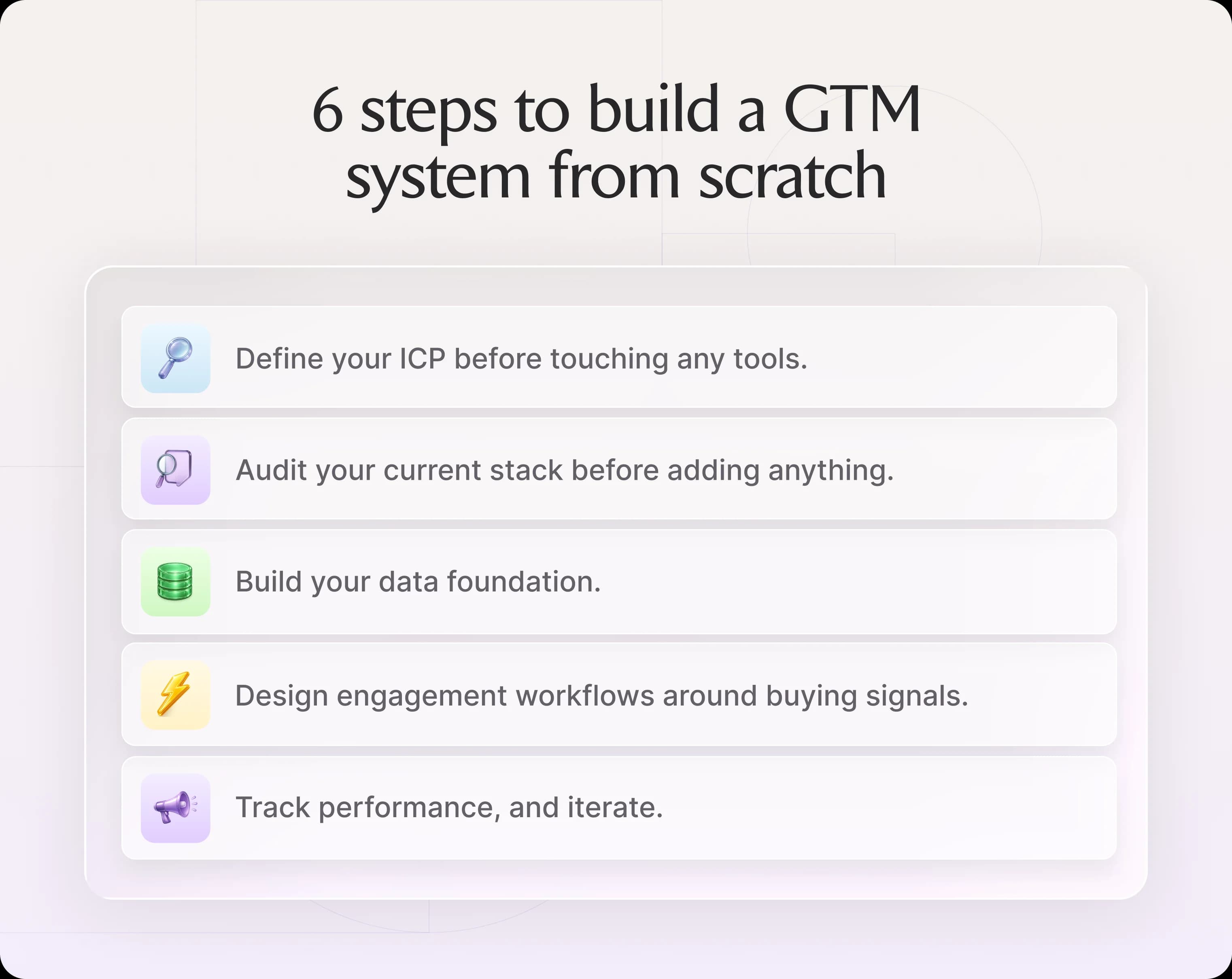
To build a GTM system effectively, you need to assemble the different operational layers in sequence. Start with ICP, audit the stack, clean the data layer, design signal-based workflows, define handoff rules, then test the whole system.
Step 1: Define your ICP before touching any tools
Start with firmographic fit: industry, company size, revenue, location, and growth stage.
Then sharpen the ICP with technographic and behavioral signals. Look at which tools target accounts use, what roles they are hiring for, and if they recently raised funding, their leadership changed, or they visited high-intent pages.
Then, validate the ICP against closed-won data in your CRM. HubSpot, Salesforce, and Clay can help you compare won and lost accounts and identify patterns by segment, source, and intent signals using built-in AI assistants.
Step 2: Audit your current stack before adding anything
Map every marketing and sales tool in use and its adoption level among reps. The fastest way to do this is to ask employees to detail their use over the last 30 days.
Once you have a clear picture of tech use, identify where data drops off between tools. Look for fields that don't sync, duplicate records, delayed updates, missing source attribution, and manual CSV steps. This requires some initial manual work but will pay dividends later. Cut tools that duplicate functions or require complex integrations.
Step 3: Build your data foundation
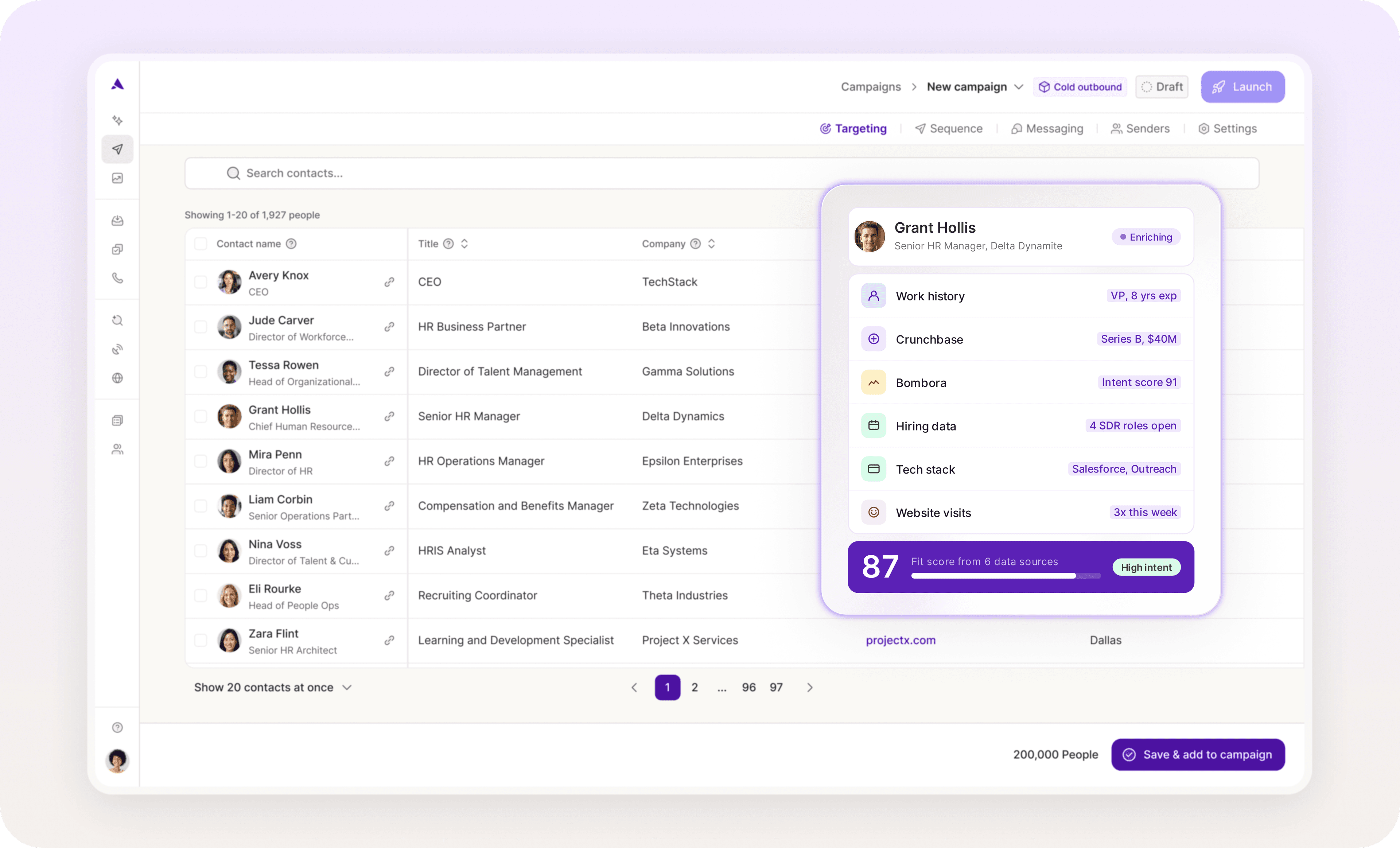
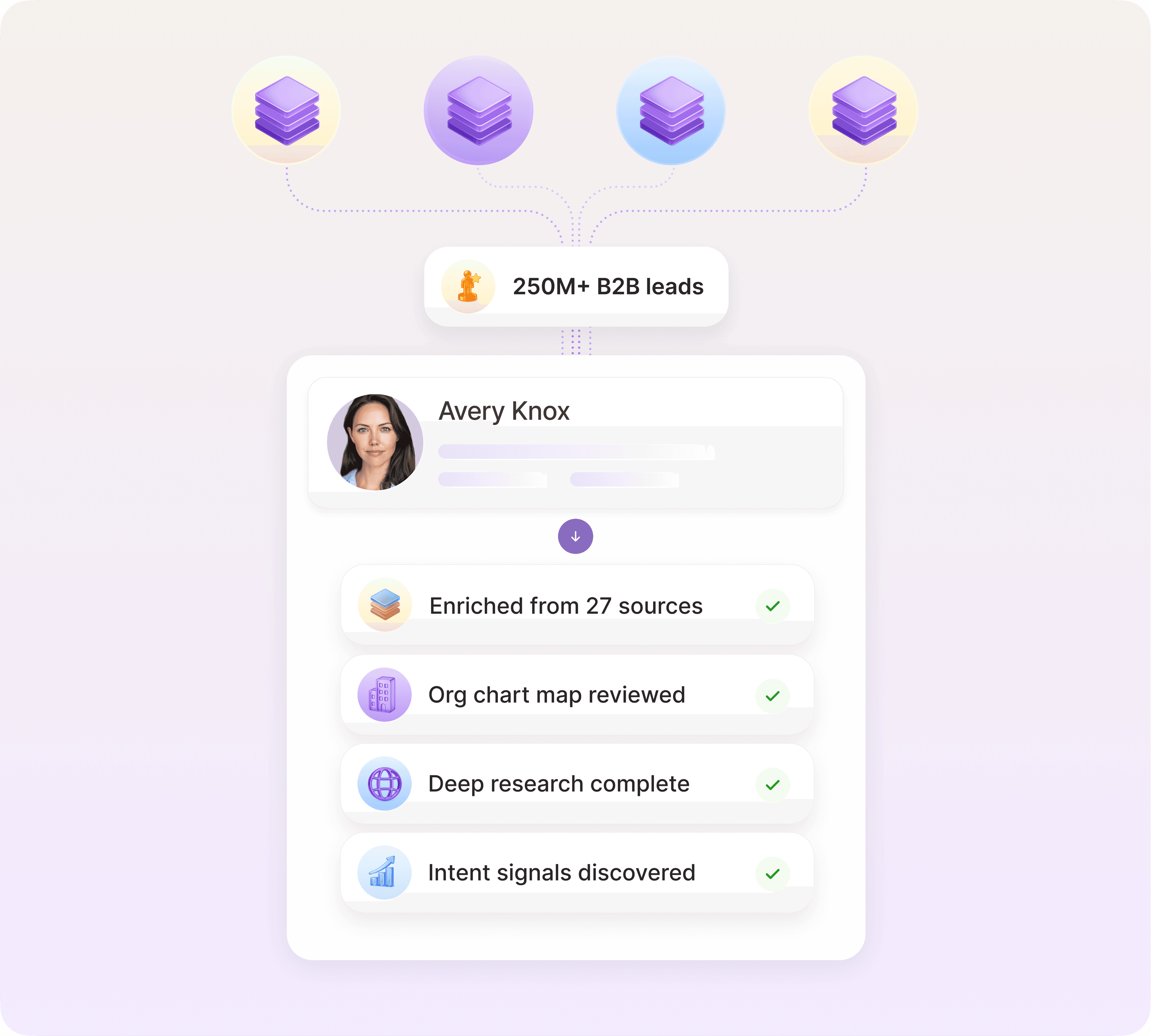
Choose a primary data provider that covers your ICP geography and verticals, ideally one that also offers waterfall enrichment. These data providers draw on dozens of sources to find and verify contacts. Artisan, for example, analyzes multiple sources of B2B data when enriching individual and company profiles.
Step 4: Design workflows around buying signals
A GTM system typically runs outreach workflows, account-based marketing, and lead nurturing. A common practical rule is to build the system around buying signals, where different signals trigger different workflows.
Define the following signal scenarios:
A target account visits the pricing page
A champion changes jobs
A company raises funding
A department starts hiring for a relevant role
A product-qualified account crosses a usage threshold
A customer account shows expansion intent
A demo form submission comes from an enterprise lead
GTM teams don't work only on net-new acquisition, so each scenario needs its own workflow. Define who owns it, what message goes out, which channel starts, what CRM stage changes, and when a human steps in.
Artisan is an AI-native outreach platform built for signal-driven workflow design. It monitors buying signals such as deanonymized website visitors, job changes, hiring patterns, web intent, and webhook triggers, then launches human-like personalized outreach based on those signals.

Step 5: Define handoff triggers between GTM roles
Define the exact conditions under which an account moves from one owner to another. Automate CRM stage updates and rep notifications at each handoff point.
It’s vital at this stage to align marketing and sales on marketing-qualified lead (MQL) and sales-qualified lead (SQL) definitions in operational terms, meaning the fields, scores, actions, and ownership changes that happen in the system.
For BDR to AE handoffs, use a threshold that combines account fit and engagement. Best practice is to require enough qualification to protect AE time while keeping the handoff fast enough to preserve buyer momentum.
Step 6: Instrument and iterate
Review the entire GTM system quarterly to catch drift before it compounds. Regular in-depth monitoring is key to refining your system over time.
Track the following GTM performance metrics:
Match rate: Percentage of your accounts that your data provider can find and return records for.
Enrichment coverage: Percentage of matched records with complete, usable fields after enrichment.
Bounce rate: Percentage of sent emails that fail to deliver due to invalid or inactive addresses.
Reply rate: Percentage of delivered emails that receive any response, including objections.
Positive reply rate: Percentage of replies expressing genuine interest or willingness to engage.
Meeting rate: Percentage of positive replies that convert into a scheduled meeting.
Qualified opportunities: Percentage of meetings that produce a sales-accepted pipeline opportunity.
Pipeline created: Total dollar value of new qualified opportunities over a given period.
Closed-won conversion: Percentage of pipeline opportunities that result in a signed deal.
Cycle length by segment: Average days from opportunity creation to close, categorized by segment.
In addition, run messaging and sequence tests before scaling outreach. Test one variable at a time, whether a trigger, subject line, opening angle, proof point, CTA, or the order of different channels you use (such as email first, social media second, SMS third, etc.).
Where AI fits in a modern GTM system
AI removes manual execution across a range of functions and can act on more context than a human reviewer can process at scale. Let’s look at how AI can streamline and scale a GTM system using Artisan as an example.
AI for prospecting, enrichment, and scoring
AI can identify accounts that match your ICP from both lead databases and across the web. It can then enrich contacts in real time, replacing manual research.
AI scoring also helps identify which accounts deserve attention by dynamically analyzing closed-won and closed-lost deals (among other data points) in the last 30 to 90 days.
AI BDR Ava, an AI BDR around whom Artisan is built, searches for verified B2B contacts, enriches prospects, prioritizes leads with buying signals, and builds targeted lists aligned with your ICP, all without human intervention.
AI for outreach personalization
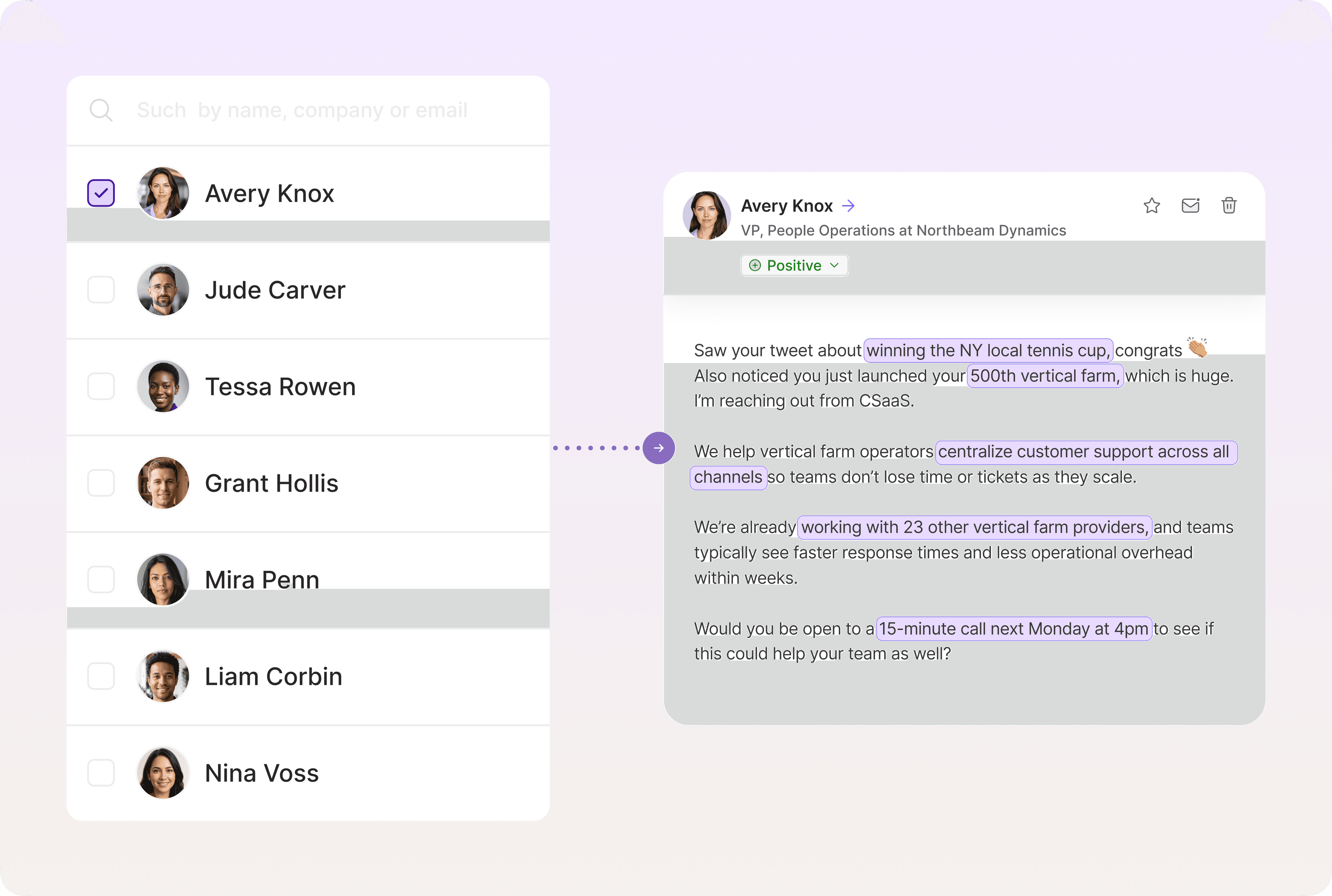
Generative AI can write personalized emails using a wide array of inputs, including company news, role changes, intent signals, and CRM history.
The system still needs guardrails, however. Gong found that executive reply rates drop sharply once emails exceed 100 words, and emails filled with buzzwords and vague ROI claims also reduce reply rates.
To write deeply personalized messages, Artisan trains on best-performing sequences and matches reps' writing voice. Ava also retrains her model as replies come in, catching sentiment shifts and adjusting subsequent emails accordingly.
AI agents as execution layers
AI agents can now run full outbound workflows, including prospecting, message delivery, and reply handling. Humans still own strategy, but AI takes over the repeatable execution work that used to absorb BDR capacity.
AI BDR Ava, for example, automates 80% of outbound execution, from lead discovery to personalized outreach. She also tracks intent signals and runs A/B tests on campaigns, handles objections, and books meetings, so reps stay focused on closing.
A GTM system is how you scale without scaling headcount
The benefits of an effective GTM system are cleaner accounts, faster handoffs, clearer ownership, and feedback loops that sharpen your strategy and operations each quarter.
Artisan is an AI-native outreach platform built for modern GTM motions. AI BDR Ava handles the whole execution layer of outbound, from finding and enriching leads to acting on intent signals. Meanwhile, your team retains the strategy and judgment that machines cannot replicate.

Automate your outbound with an AI BDR
Meet Ava—your AI BDR who handles prospecting, outreach, and follow-ups, so your team can focus on closing.

Jenny Romanchuk
SME @ Artisan
Jenny creates senior-level content for sales, SEO, and marketing professionals. She also leads partnerships at the District #1 Charitable Foundation.