Winning back lost customers: 3 proven steps
Win back lost customers with bold outbound tactics, personalized emails, and loyalty perks, all automated to save your team time.
Sustainable SaaS growth doesn't come exclusively from new pipeline. Keeping customers and expanding their accounts is equally important.
You're reading this because you already know churn is a problem. Odds are you’re working on fixing retention. But you also need to win back the customers you've lost.
Let’s look at how.
Why Winning Back Lost Customers Is So Worth It
Winning back lost customers costs a fraction of landing new ones. You skip the entire education and trust-building phases, along with the lengthy sales cycles required to convert strangers.
Most of Them Don’t Hate You
Involuntary churn is the silent killer that accounts for up to 40% of total churn in many businesses, according to Churnkey’s State of Retention 2025 report.
Nearly half of all cases are payment failures due to insufficient funds. Another 10 to 15% are expired or lost cards. These customers aren't choosing to leave—their payment method failed, and nobody fixed it.
The report also showed that 70% of involuntary churn can be recovered through card retries and recovery campaigns.
Warm Is Better Than Cold
Let’s say a customer did choose to cancel their subscription. This doesn’t mean they’re lost forever.
Many churned customers will come back if you give them the right reason. The same data from Churnkey found that of the customers who accepted retention offers, 53% chose discounts.
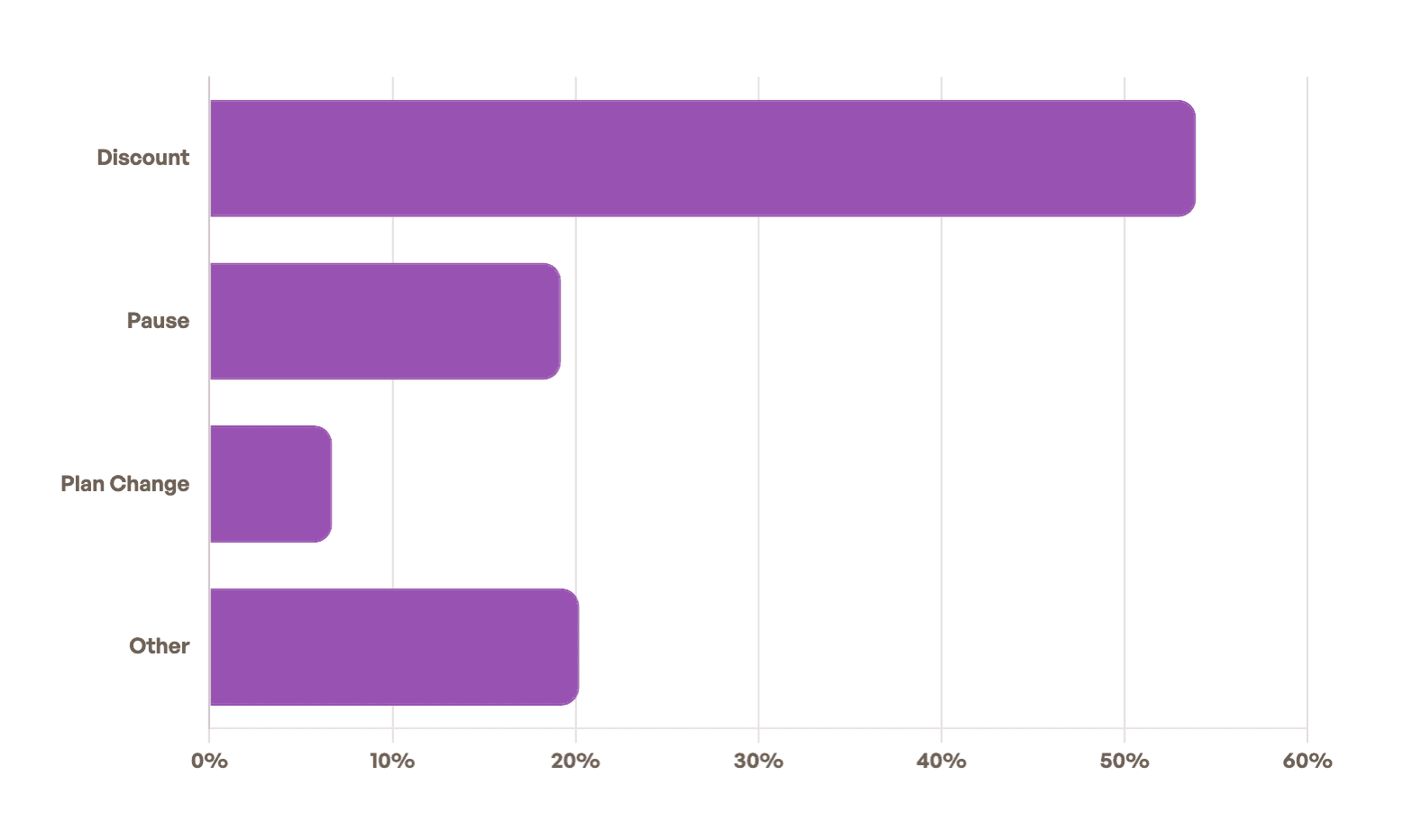
An extra incentive, like a discount or white-glove support, costs you nothing. But that investment is still much smaller than the full sales cycle required to land a brand-new customer.
The Reactivation Paradox
What separates successful SaaS companies from struggling ones?
Where their growth comes from.
Churnkey's State of Retention report by ChartMogul demonstrated a clear pattern. Companies with net revenue retention (NRR) of 60% or below depend on new business for 70% of their revenue and reactivation for 15%. Meanwhile, companies with NRR above 100% (indicating growth) get over half their revenue from expansion and only 4% from reactivation.
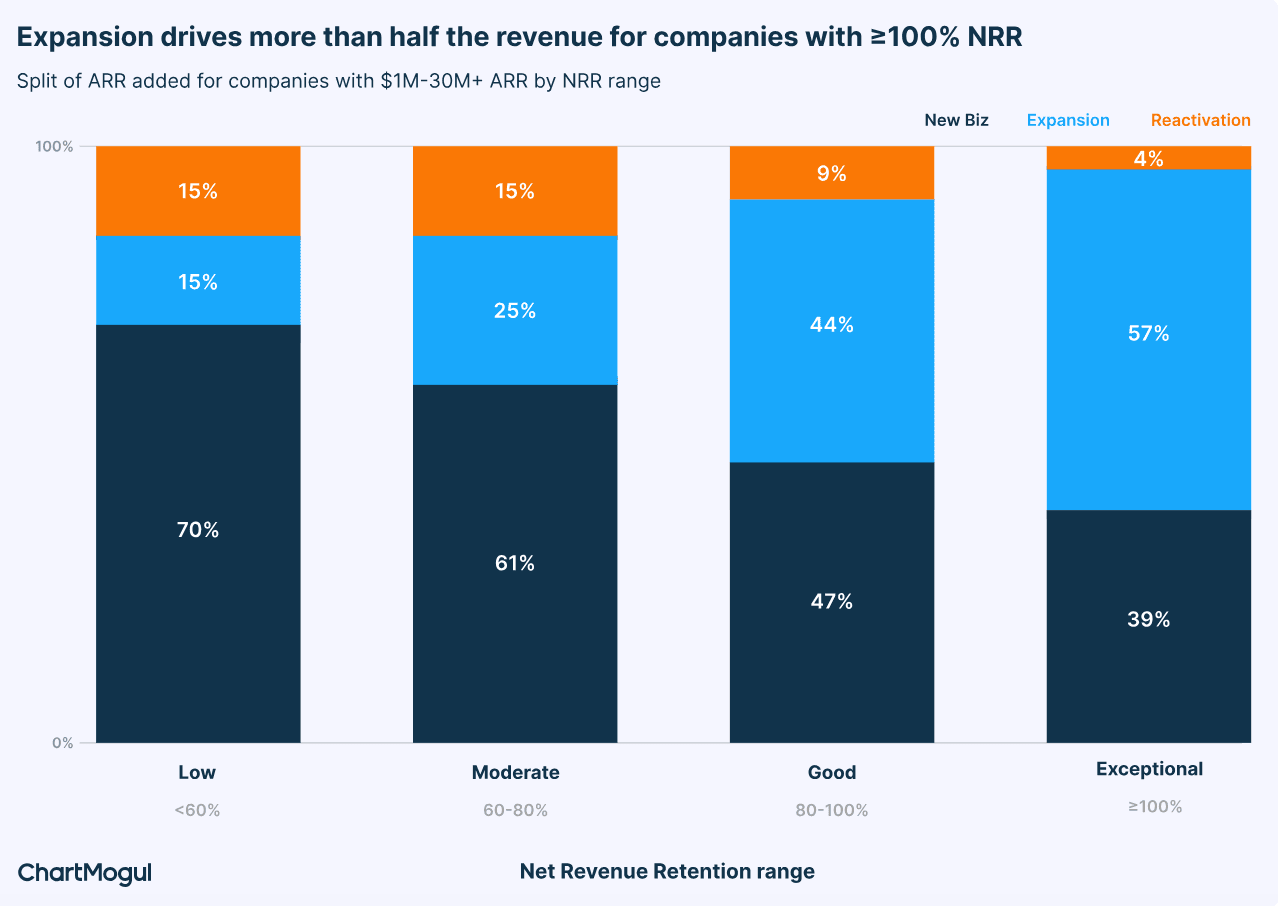
That 15% to 4% drop in reactivation revenue isn't because win-backs matter less for successful companies. It's because they rarely lose customers in the first place.
Every customer who churns and needs reactivating is potentially someone you could have kept with better onboarding, proactive support, or targeted interventions. High-performing companies spot warning signs early and intervene before churn happens.
If win-backs make up a significant portion of your growth, that's your signal. It means you need to focus on two things: recovering customers that have lapsed recently and fixing whatever's breaking upstream.
The Real Cost of Churn (Quick Breakdown)
Every churned customer represents a more serious hit to your bottom line than it might seem at first sight.
Deceiving Churn Rates
Even a seemingly low monthly churn rate of 5% results in losing nearly half (46%) of your starting customer base annually (0.9512 ≈ 54). A rate that seems manageable month-to-month creates massive instability over time.
The LTV Problem
Losing $10,000 in annual recurring revenue (ARR) stings. But losing $50,000 in customer lifetime value (LTV)? That's what churn costs.
When a customer churns, you don't just lose this month's payment or this year's contract value. You lose every future payment they would have made for the entire duration they would have stayed.
ChartMogul's retention data found that companies with strong retention equal to or greater than 100% NRR grow at 48% year-over-year—more than double the speed of companies with weaker retention. That's the compounding power of retention: customers who stay longer also expand their accounts, upgrade plans, and refer new business.
The CAC Multiplier Effect
Churn hits you twice: you lose future revenue, and your customer acquisition costs (CACs) increase.
If you spent $1,000 to acquire a customer and they churn after one year instead of three, your effective CAC just tripled from $333 per year to $1,000 per year.

Automate your outbound with an AI BDR
Meet Ava—your AI BDR who handles prospecting, outreach, and follow-ups, so your team can focus on closing.
Step One: Understand Why They Left
Understanding why people churn gives you the intelligence to build a targeted customer win-back strategy. Just as importantly, it reveals what's breaking earlier in the customer lifecycle so you can fix it and prevent future churn.
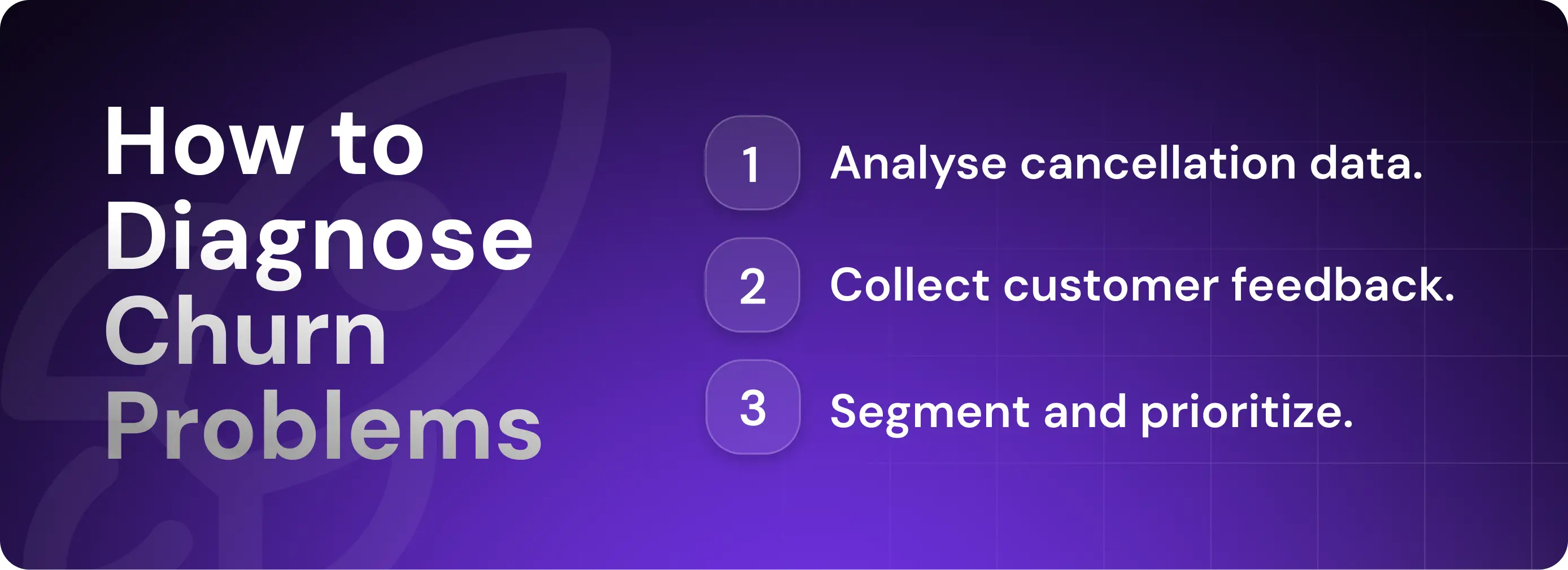
Look Into Cancellation Flow Data
Start with the data sitting in your product analytics system.
Track usage patterns before cancellation. In your product analytics platform (if you haven’t adopted one yet, it’s time), you should be able to see what happened in the days and weeks leading up to churn.
Were they logging in daily until the week before cancellation, or had they gone dormant months earlier? A customer actively using your product who suddenly cancels likely hit an addressable constraint. A customer who faded out over three months never got value from your product.
You might not be able to reactivate these customers easily, but you can fix onboarding and product adoption flows for future customers. The key question to ask is what percentage of churn comes from serious product problems versus addressable constraints?
Gather Customer Feedback
Continue digging by gathering direct feedback when customers leave through exit surveys and interviews.
Exit surveys capture sentiment at the moment of cancellation. Keep them short—one to two questions. Ask for the primary reason they're leaving and what would bring them back.
For high-value accounts, use exit interviews. A 15-minute conversation with a churned enterprise customer will often reveal nuance that surveys miss. You'll learn whether they left because of budget cuts (temporary), a competitor (addressable), or fundamental product gaps (harder to solve).
Segment Lost Customers
Not all churned customers deserve the same effort. Build segments by layering three key dimensions: value, engagement, and churn reason.
1. Start With Customer Value
Lifetime value (LTV) or annual contract value (ACV) determines how much effort to invest. Value should be your first filter—high-value accounts receive personalized communication while low-value accounts are fed into an automated sequence.
2. Layer in Activity Before Churn
Customers who were actively using your product right up until cancellation are fundamentally different from those who went dark three months before dropping off. High-engagement churners are more likely to return compared to low-engagement ones who never reached their aha moment.
3. Add “Churn Reason” as a Targeting Filter
The reason that a customer left should determine your reactivation approach.
Here are the most common reasons that customers churn:
Budget and pricing
Infrequent usage
Missing features
Poor support or onboarding
Involuntary (payment failure)
Combines these dimensions to build prioritized win-back segments.
Here's what this looks like in practice:
Immediate personalized outreach: High value and high engagement with a specific addressable reason for cancelling their subscription (e.g., pricing, features, or support).
Semi-automated campaigns with some personalization: High value with low engagement and an addressable reason; medium value with high engagement and an addressable reason.
Fully automated sequences: Low value and an addressable reason; medium value showing involuntary churn.
Deprioritize or exclude: All former customers with fundamental product-fit issues; low-value accounts that went dormant before churn.
Use Your CRM Data
Your CRM is likely a valuable source of data about customers that have dropped off or are likely to in the near future. Monitoring this data for common churn signals helps you identify and reactivate customers before you lose them.
The following CRM signals can be especially useful:
External signals (hiring, funding, job changes): Use intent data platforms like LinkedIn Sales Navigator or Artisan to track what's happening at churned accounts. These tools monitor company funding rounds, hiring activity, and recent announcements. They also integrate directly with your CRM, automatically enriching customer records with fresh data.

Website activity: Use your marketing automation platform (Artisan, HubSpot, Salesforce, etc.) to track when someone from a churned account visits your site. Connect this to your CRM so you can see which churned customers are browsing your pricing page or product features—this indicates ongoing interest.
Content engagement: Sync email opens, clicks, and content downloads from your email marketing platform back to your CRM.
The goal is to centralize all signals in one place so you can build dynamic segments that combine churn reason, customer value, engagement level, and behavioral triggers.
Combine these signals with your tier system. A high-value account that just raised funding and is visiting your pricing page should become your top re-engagement priority.
Before re-engaging, build a sourced brief on why the customer left and what has materially changed since then. Include unresolved issues so the account owner does not repeat an old promise. Maintaining this context is a recurring research assignment to evaluate with Artie. The owner should decide whether the new evidence gives the customer a credible reason to return.
Step Two: Run Tactical Win-Back Campaigns
A good win-back campaign is personalized, timely, and multichannel—it addresses why a customer left and meets them where they are.
In this step, you'll build email sequences, incorporate LinkedIn and SMS outreach, and time messages around behavioral triggers—all in a way that converts without feeling pushy.
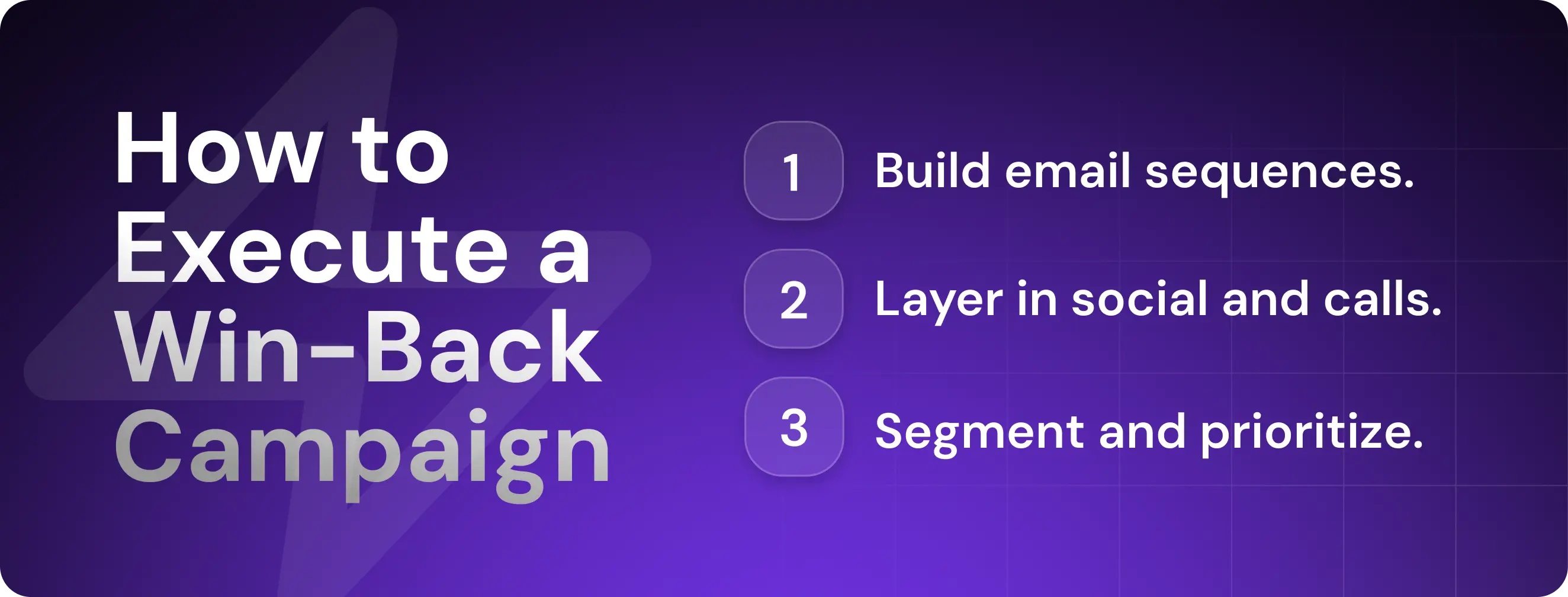
Personal Email Outreach
Here’s how to build effective reactivation emails in four steps:
1. Reference the recipient’s reason for cancelling in the subject line. Pull specific feedback from exit surveys or cancellation data to identify the problem that caused them to leave. Say that you have addressed it in your subject line: "We’ve fixed [cited issue]."
2. Open the email by expanding on the subject line. Tie the opening directly to their churn reason that you referenced in the subject line. "You mentioned needing [missing feature] when you canceled. We launched it last month."
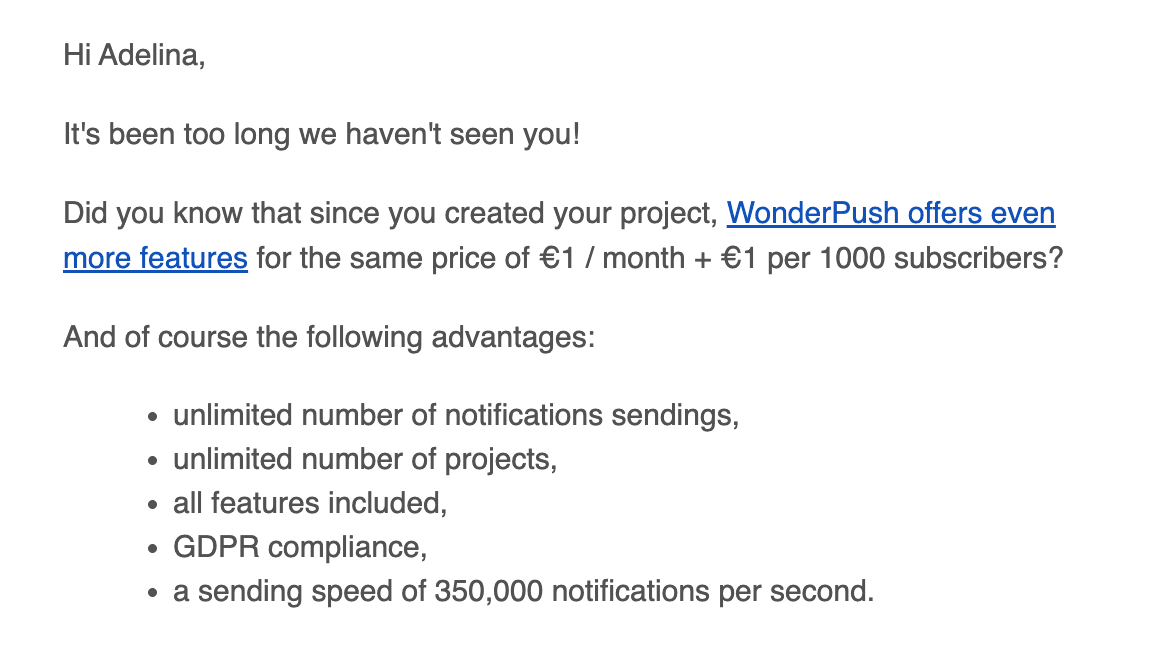
3. Offer an incentive when needed. Some accounts will need an extra push, such as discounts, extended trials to test new features, or VIP support.
4. Build sequences, not one-offs. Create sequences with three to five messages spaced over two weeks. Remember that email doesn't have to work alone—layer in other channels to add more touchpoints without overwhelming recipients.
Reconnect via LinkedIn & Social
Build multichannel sequences that combine email with social touches. Reaching out over different channels can dramatically increase response rates compared to relying on just one.
Here's an example of a multichannel sequence:
Day 1: Send personalized email.
Day 4: LinkedIn connection request.
Day 6: LinkedIn InMail (or a direct message if the request is accepted).
Days 7 to 21: Retargeting ads running in the background.
Day 11: Follow-up email.
Following up more than three times on a single channel becomes intrusive and drives up spam complaints. Research by Belkins on email follow-ups shows that reply rates drop with each additional message while spam complaints climb from 0.5% on the first email to 1.6% by the fourth.
At the same time, response rates on LinkedIn are consistently strong, and the platform gives you engagement options beyond direct messages, such as liking posts. This means you can add more touchpoints without triggering the fatigue that comes from repeated emails.
Drop a Call or SMS
For your highest-value churned accounts, pick up the phone.
Call these accounts directly. And remember to stay consultative, not salesy. For example, you might say, "I wanted to understand what led to your cancellation and see if there's a way we can address those concerns." If their churn reason is addressable, offer a specific solution. If it's not, thank them for their time and move on.
For time-sensitive offers, you can add SMS to your outreach cadence. Keep it brief: "We just launched [relevant feature]. Interested in a quick call to walk through it?"
Reserve these two methods for high-intent accounts—don't bombard all churned customers with texts and calls.
Time Your Outreach Right
Calendar timing doesn't matter much—Hunter's State of Cold Email report found that decision-makers don't care whether you reach out in March or December.
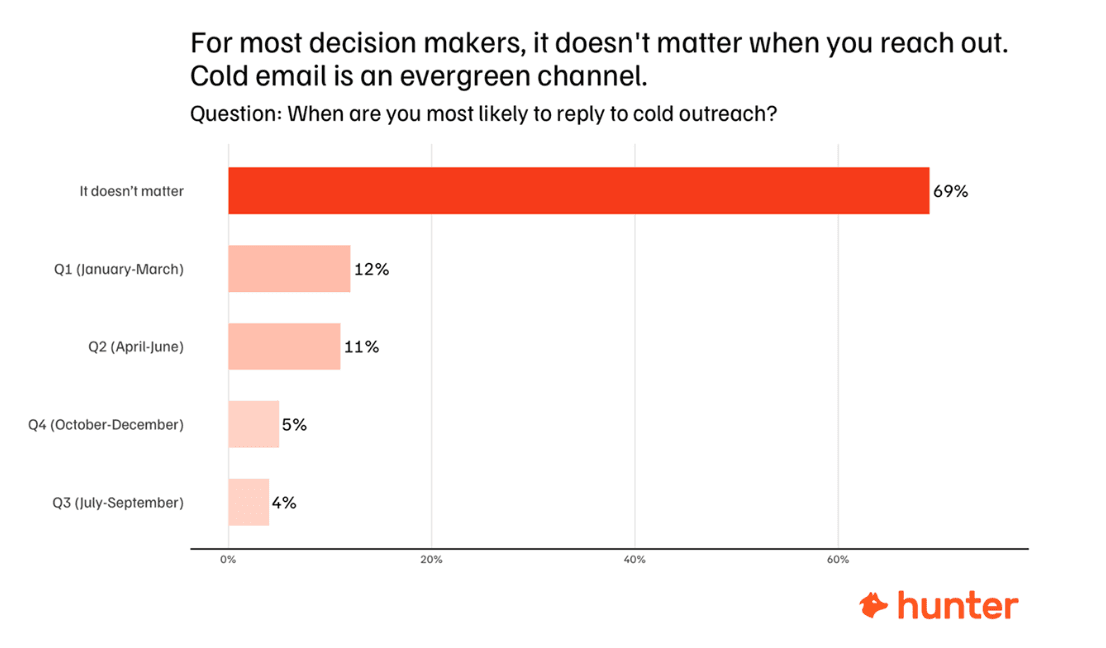
Day-to-day response rates do fluctuate slightly. Belkins' research discovered that Thursday gets the highest reply rate at 6.87%, and late evenings outperform mornings.
But don't obsess over these micro-optimizations. The recipient's own timeline matters far more.
Here are the signals and patterns you should base your outreach timing on:
Feature launches: If you shipped something a former customer requested, reach out immediately while the need is still top of mind.
Renewal anniversaries: Contact them around when they would have renewed, as budget cycles and vendor evaluations follow predictable patterns.
Fiscal cycles: B2B budgets reset quarterly or annually, so time outreach to when new funds are available (especially for budget-driven churns).
Behavioral signals: When a past customer visits your pricing page, opens multiple emails, or engages with content, shorten your interval and reach out while interest is high.
Company milestones: Track funding rounds, product launches, or hiring activity that signals budget constraints have lifted or needs have changed.
In other words, if a company just hired a new decision-maker in a relevant role, don't wait for Thursday evening to reach out.
When You Shouldn’t Try to Win Back Customers
There are three types of churned customers you should never try to reactivate:
Customers who explicitly opted out: If they unsubscribed from all communications or requested no contact, respect that—if not for courtesy, then for avoiding CAN-SPAM and GDPR violations.
Accounts with unprofitable usage: If their support burden was excessive, their contract value was too low, or they consistently pushed boundaries on usage limits, let them stay gone.
Customers who were abusive to your team: Anyone who repeatedly violated terms of service or created ongoing friction isn't worth the effort.
Step Three: Use Data and Automation to Scale
Manual win-back campaigns work for your top 20 accounts. But what happens when you're tracking 200 churned customers, monitoring behavioral signals across all of them, and trying to personalize outreach for each segment?
You need a system that will handle the repetitive work while keeping outreach personalized and relevant.
Your CRM Is Your Best Friend
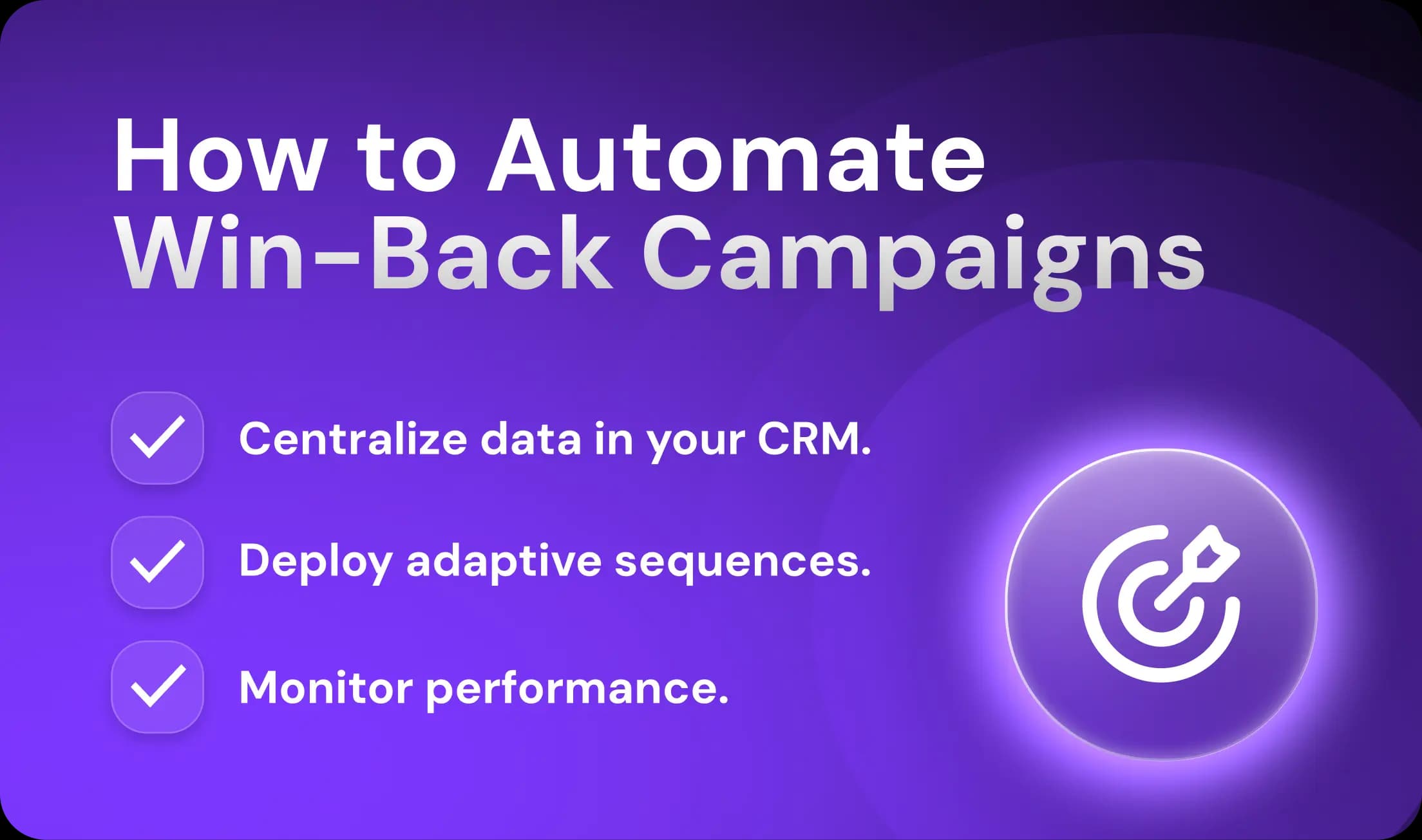
Your CRM is your single source of truth for automated win-back campaigns. Start by configuring it to initiate, track, and optimize outreach sequences.
Here's what you need to set up in your CRM before launching outreach:
Automated triggers and smart lists that update dynamically based on churn date, customer value, engagement signals, and behavioral triggers so high-priority accounts automatically surface at the top of your queue.
Outcome tracking and feedback loops that tag each account with campaign results, like "Reactivated after discount offer" and "Using competitor product," to identify patterns and optimize future campaigns.
Integration with external tools like intent data platforms, marketing automation, and product analytics so signals like funding announcements or website visits flow directly into CRM records.
At first, this may seem like extra work, but you'll quickly see the value of centralizing all your customer data in one system.
Automate Sequences Across Channels
Sales automation platforms let you build sequences that automatically send emails, trigger social media connection requests, and queue SMS messages. But just using automation on its own isn’t enough. Solid workflows are what make a real difference.
Start With Segmentation
Build separate sequences for different customer segments (based on your CRM data). Route each account to the right sequence based on its value, churn reason, and engagement level.
Go Beyond Static Workflows
The old approach—same seven emails to everyone, no matter what—never worked well.
Modern platforms let you create sequences that adjust based on behavior. If a churned customer opens your first email but doesn't click, they get a different follow-up tailored to their CRM profile.
Let AI Handle the Personalization
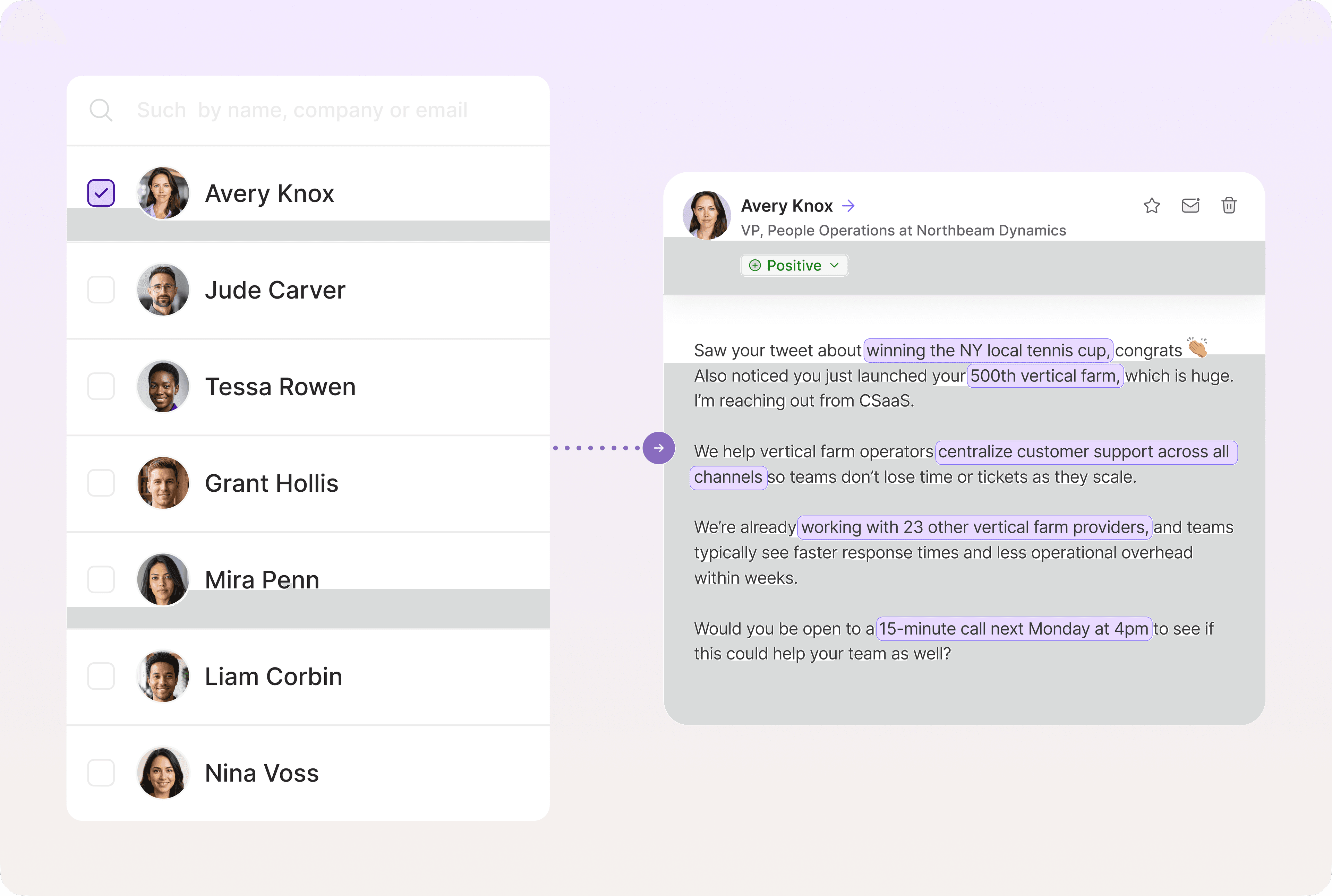
AI tools can reference specific account details—recent funding rounds, job changes, feature requests from exit surveys, etc.—without manual data entry.
Instead of writing "We added [feature name]" and hoping your merge tag populates correctly, AI pulls the actual feature they requested from your CRM notes and writes, "You mentioned needing a Salesforce integration when you canceled. We launched it last month, and it's already being used by 200 of our customers."
Tools like Artisan can run these sequences end-to-end. AI BDR Ava routes accounts to the right workflow, personalizes messages based on behavioral data, and follows up across different channels.
Use Outreach Sequences That Work
Aim for five to seven touchpoints over two to three weeks. Fewer than five doesn't give them enough chances to respond. More than seven risks spam complaints.
Here’s a six-touchpoint sequence you can use as a foundation:
Email that references the main addressable concern that caused them to leave.
LinkedIn connection request with a note that mentions one of their posts or a company announcement.
LinkedIn DM asking if they’re currently looking for products like yours.
Email follow-up offering a discount or other subscription incentive.
SMS or call following up to see if they received previous emails.
Final email to say that you won’t be reaching out anymore.
Drawing on three different studies by Hunter, Belkins, and Expandi, we found that win-back campaigns typically generate the following results:
First email: 3% to 8% response rate
LinkedIn connection (with prior warmup): 22% acceptance rate
LinkedIn message: 10% response rate
Email follow-ups: 5% to 8% response rate per touch
Final breakup email: 5% to 7% response rate
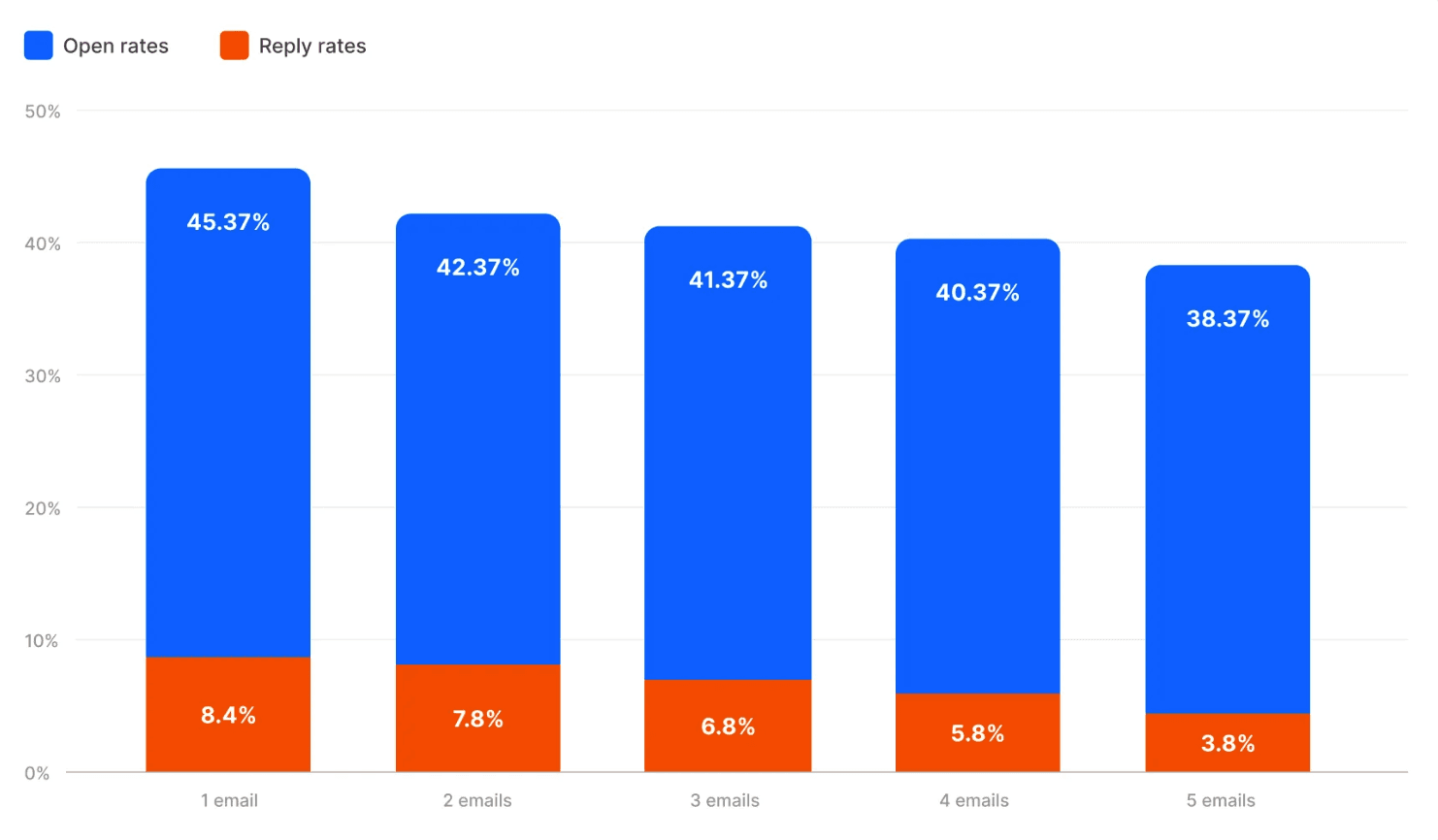
Your rates will vary based on segmentation quality, message relevance, and how well you've addressed the original churn reason. If you're consistently below these benchmarks across all tiers, revisit your messaging or targeting.
Optimize Based on Metrics
Monitor email health continuously, then review campaign performance monthly to guide strategic adjustments.
Track these email metrics as your first priority:
Open rates: Aim for above 30% through the first three emails.
Reply rates: Track positive vs. negative replies to gauge whether your messaging resonates.
Spam complaint rates: This should stay under 0.1%. Anything above 0.3% can trigger Google's spam filters and tank deliverability.
If spam complaints spike or opens crater, stop and diagnose immediately. Don't wait for monthly reviews.
Here are the main win-back campaign performance metrics to review monthly:
Channel performance: Which channels drive the most responses? If LinkedIn gets 15% response rates but email sits at 3%, shift more touches to LinkedIn.
Win-back rate by segment: Track the percentage of churned customers who reactivate, broken down by tier, churn reason, and campaign type. Eventually, you’ll see where to focus your resources.
Cost per reactivation: Divide total campaign cost by the number of reactivations. Compare this to your CAC.
At the end of the day, your goal is to minimize cost per reactivation while maximizing the lifetime value you recover. You don’t need to track dozens of metrics to do this, but you do need to track the right ones.
Let Artisan Win Customers Back For You
You can spend weeks monitoring churned customer behavior, segmenting accounts, and crafting personalized campaigns for each tier. Or you can let Artisan handle it automatically and with better precision.
Intent Signal Monitoring
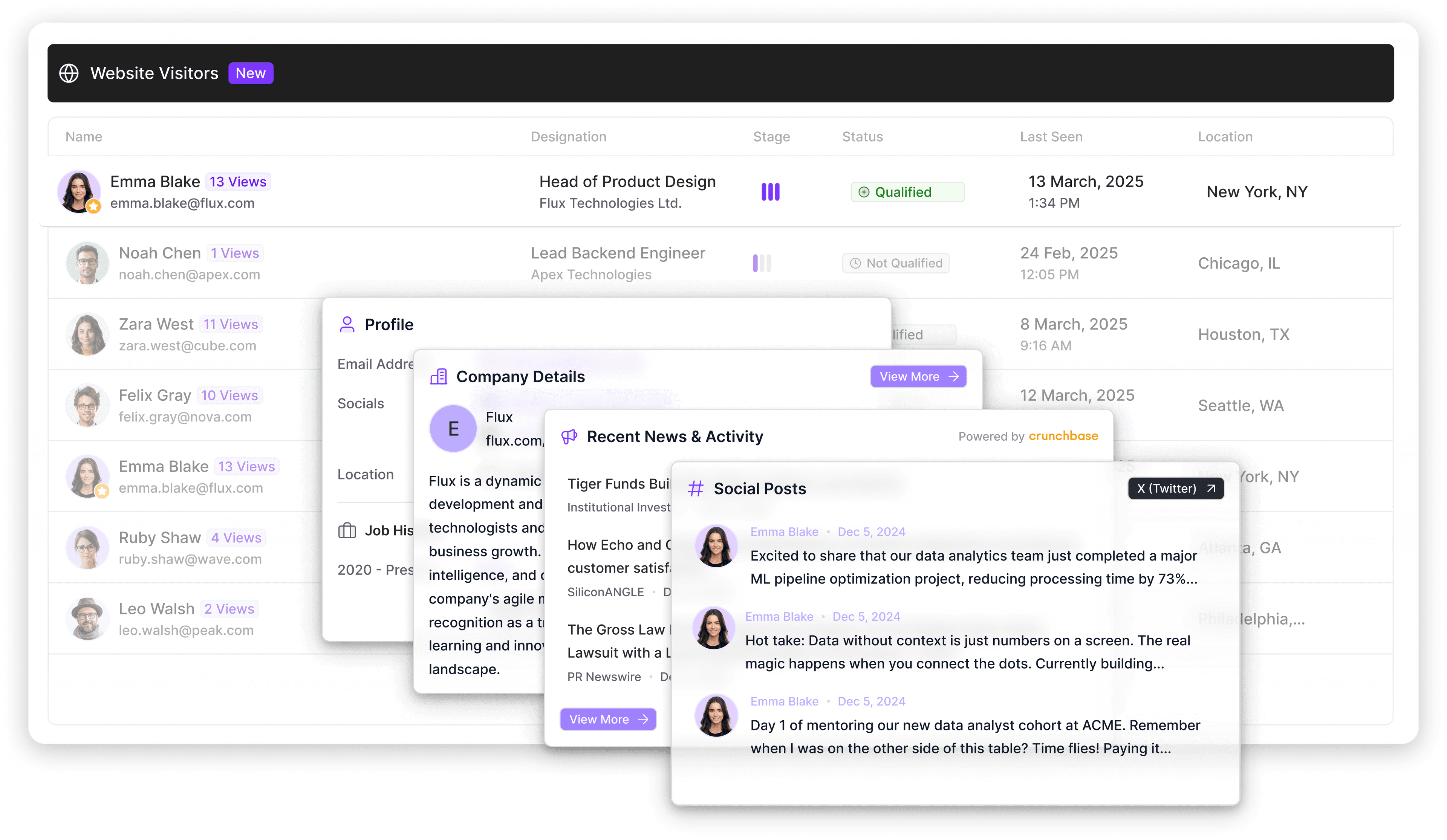
Artisan automatically tracks behavioral signals across churned accounts—website visits, funding announcements, job changes, and content engagement. When a high-value account shows interest, Artisan triggers outreach immediately.
AI-Powered Personalization
Artisan uses advanced AI algorithms to research every account and incorporate what it finds into outreach. The result is deeply personalized messages that reference the most relevant information for specific recipients.
Multichannel Sequences
Artisan’s AI BDR Ava builds sequences across email and professional social networks so you don't have to juggle multiple tools. Tell Ava about your sales playbook once, and she handles the rest.
Your Final Push Toward Winning Back Lost Users
Every week, new accounts will hit your "churned" list. Every month, former customers will raise funding, hire new decision-makers, or hit their busy season. You can't manually monitor all these signals and craft personalized campaigns for every account.
Artisan handles these essential tasks while you focus on improving customer retention upstream. The platform monitors signals, triggers sequences, and optimizes campaigns continuously—helping you recover customers with a fraction of the manual work.
Automate your outbound with an AI BDR
Meet Ava—your AI BDR who handles prospecting, outreach, and follow-ups, so your team can focus on closing.

Adelina Karpenkova
SME @ Artisan
Adelina Karpenkova is a writer helping businesses tap into AI's potential and clear up misconceptions. She works with B2B teams on latest industry knowledge.